
Introduction
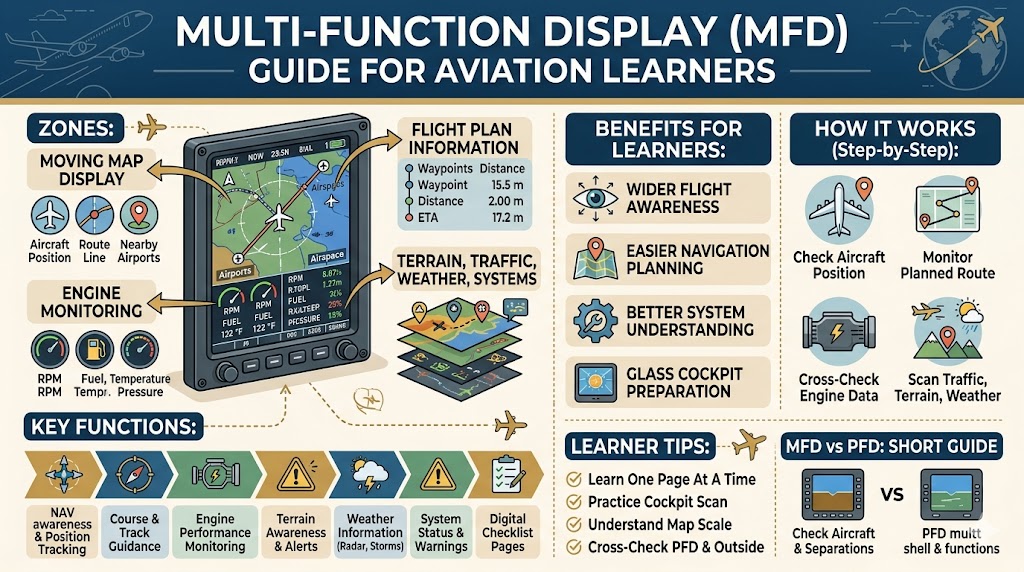
A Multi-Function Display is one of the most useful screens in a modern aircraft cockpit. It helps pilots see important information about navigation, route, weather, terrain, traffic, engine performance, and aircraft systems in one place.
For aviation learners, the Multi-Function Display may look complex at first. It can show maps, lines, symbols, numbers, airports, waypoints, warnings, and system pages. But once you understand its basic purpose, it becomes much easier to read.
Modern aircraft cockpits often use digital screens instead of only traditional round instruments. These digital screens are part of a glass cockpit system. In this setup, the Primary Flight Display shows the main flight information, while the Multi-Function Display gives wider flight awareness.
This Multi-Function Display Guide for Aviation Learners explains the MFD in simple English so students, beginner pilots, simulator users, and aviation enthusiasts can understand it step by step.
What Is a Multi-Function Display?
A Multi-Function Display, also called an MFD, is a digital cockpit screen that can show many types of information depending on what the pilot selects.
It is called “multi-function” because it does not perform only one job. Instead, it can display different pages and features such as:
- Moving map
- Flight plan
- Route information
- Engine data
- Weather display
- Traffic information
- Terrain awareness
- System status
- Warning messages
In simple words, the MFD is like an information center inside the cockpit. It helps pilots understand not only how the aircraft is flying, but also what is happening around the aircraft.
The MFD supports better decision-making because it gives pilots a wider picture of the flight.
Why Aviation Learners Should Understand the MFD
Aviation learners should understand the MFD because many modern training aircraft, private aircraft, business jets, and commercial aircraft use glass cockpit displays.
Learning the MFD helps students develop better cockpit awareness. It allows them to understand navigation, route planning, aircraft systems, weather, terrain, and traffic more clearly.
The MFD is especially useful for learners because it helps with:
- Understanding aircraft position
- Reading routes and waypoints
- Learning flight planning basics
- Monitoring engine performance
- Understanding weather and terrain awareness
- Practicing simulator navigation
- Preparing for modern aircraft cockpits
- Building confidence with digital aviation displays
A beginner should not try to learn every MFD page in one day. The best method is to learn one section at a time, starting with the moving map and flight plan.
Difference Between PFD and MFD
In a glass cockpit, two important displays are the Primary Flight Display and the Multi-Function Display. Both are important, but they have different roles.
The Primary Flight Display, or PFD, shows the main information needed to control the aircraft. The Multi-Function Display, or MFD, shows supporting information for navigation, planning, systems, traffic, terrain, and weather.
| Feature | Primary Flight Display | Multi-Function Display |
|---|---|---|
| Short Name | PFD | MFD |
| Main Purpose | Shows main flight information | Shows navigation, systems, weather, traffic, and planning information |
| Focus Area | Flying the aircraft | Managing the flight |
| Common Information | Attitude, airspeed, altitude, heading, vertical speed | Map, flight plan, engine data, terrain, weather, traffic |
| Location | Usually in front of the pilot | Usually beside the PFD |
| Learner Use | Helps understand aircraft control | Helps understand flight awareness and planning |
A simple way to remember the difference is this: the PFD helps the pilot fly the aircraft, while the MFD helps the pilot manage the flight.
Main Information Shown on a Multi-Function Display
The MFD can show different types of information. The exact features depend on the aircraft and equipment, but most MFDs provide important support for navigation and awareness.
Moving Map Display
The moving map is one of the most common and useful parts of the MFD. It shows the aircraft position on a digital aviation map.
A moving map may show:
- Current aircraft position
- Planned route
- Nearby airports
- Waypoints
- Airspace boundaries
- Terrain
- Navigation points
- Lakes, rivers, roads, or city references
- Distance to destination
The moving map moves as the aircraft moves. This helps pilots understand where the aircraft is in relation to the route and nearby locations.
For aviation learners, the moving map is usually the easiest part of the MFD to understand because it looks similar to a digital map. However, aviation maps contain special information used for flight safety and navigation.
Flight Plan Information
The MFD can show the aircraft’s flight plan. A flight plan is the planned route from departure to destination.
Flight plan information may include:
- Departure airport
- Destination airport
- Waypoints
- Route legs
- Distance between points
- Estimated time
- Ground speed
- Remaining distance
- Arrival information
For learners, this is very helpful because it shows how pilots organize a flight before and during the journey.
Instead of only knowing the destination, the pilot can see each step of the route. This helps with better navigation and planning.
Navigation Data
Navigation data helps pilots follow the correct route. The MFD may show course lines, GPS route, heading, track, distance, and other navigation details.
Some basic navigation terms learners should understand are:
- Heading: the direction the aircraft nose is pointing
- Track: the actual path the aircraft is moving over the ground
- Course: the planned path the aircraft should follow
- Waypoint: a specific point used for navigation
- Distance: how far the aircraft is from a point
- Estimated time: how long it may take to reach a point
Beginners often confuse heading, track, and course. These are connected, but they are not the same. Wind can push the aircraft sideways, so the aircraft heading may be different from the actual ground track.
The MFD helps pilots see these differences clearly.
Engine Monitoring
In many aircraft, the MFD can show engine information. This helps pilots monitor the health and performance of the engine during flight.
Engine data may include:
- RPM
- Oil pressure
- Oil temperature
- Fuel quantity
- Fuel flow
- Cylinder temperature
- Exhaust gas temperature
- Battery voltage
- Electrical system status
Engine monitoring is very important because safe flight depends not only on flying the aircraft correctly but also on keeping the engine within safe limits.
For aviation learners, engine pages on the MFD help explain how aircraft performance and engine health are connected.
A learner should understand that pilots do not look only at maps. They also check engine and system data regularly.
Weather Information
Some MFDs can show weather information, depending on the aircraft equipment and available systems.
Weather information may include:
- Rain areas
- Storm cells
- Wind information
- Cloud patterns
- Lightning data
- Weather radar images
- Precipitation areas
Weather awareness helps pilots make safer decisions. For example, if a storm appears along the route, the pilot may choose a safer path or delay the flight.
For beginners, it is important to understand that weather shown on the MFD is a support tool. Pilots still use weather reports, forecasts, visual observation, and air traffic information.
The MFD helps pilots see weather information in a more practical cockpit format.
Traffic Awareness
The MFD may show nearby aircraft traffic. This helps pilots know where other aircraft are located around them.
Traffic information may show:
- Nearby aircraft symbols
- Relative altitude
- Direction of movement
- Distance
- Traffic alerts
Traffic awareness is very useful, especially in busy airspace, near airports, and during climb or approach.
For aviation learners, this feature helps explain why pilots must always maintain situational awareness. Even with digital traffic displays, pilots must continue looking outside when flying visually.
The MFD supports awareness, but it does not replace pilot attention.
Terrain Awareness
Terrain awareness helps pilots identify mountains, hills, high ground, and unsafe altitude areas.
The MFD may show terrain using colors or warning areas. This helps pilots understand whether the aircraft is safely above terrain.
Terrain display is especially useful during:
- Mountain flying
- Night flying
- Poor visibility
- Approach to airports near high ground
- Low-altitude operations
For students, terrain awareness is an important safety concept. The MFD helps pilots compare aircraft altitude with the ground below and ahead.
System Pages
The MFD may also show aircraft system pages. These pages depend on the aircraft type and equipment.
System pages may include:
- Electrical system
- Fuel system
- Engine system
- Environmental system
- Warning messages
- Checklist pages
- Maintenance information
These pages help pilots understand the condition of the aircraft systems.
For beginners, system pages may look technical. The best learning method is to understand the basic purpose first. These pages help pilots know whether the aircraft systems are working normally.
How Pilots Use the MFD During Flight
Pilots use the MFD throughout the flight, but the focus changes during each phase.
Before Takeoff
Before takeoff, pilots may use the MFD to check the flight plan, route, fuel, engine data, map settings, and system status. They may also check whether the correct departure airport and route are loaded.
Taxi
During taxi, the MFD may help with airport layout awareness if airport maps are available. Pilots still follow outside signs, markings, and ground instructions.
Takeoff
During takeoff, pilots mainly focus on the PFD, outside view, and engine performance. The MFD may support engine monitoring and route awareness.
Climb
During climb, the MFD helps pilots monitor the route, nearby terrain, traffic, and engine performance. It also helps confirm that the aircraft is following the correct flight path.
Cruise
During cruise, the MFD becomes very useful. Pilots use it to monitor route progress, distance, estimated time, weather, traffic, terrain, and fuel status.
Descent
During descent, pilots use the MFD to plan altitude changes, check the route, monitor destination information, and prepare for arrival.
Approach
During approach, the MFD supports navigation, airport awareness, terrain awareness, traffic monitoring, and approach planning. The pilot still uses the PFD and outside visual references carefully.
Landing
During landing, pilots focus mainly outside and on the PFD, but the MFD may still provide useful airport, traffic, and system awareness.
Benefits of Multi-Function Display for Aviation Learners
The Multi-Function Display gives many benefits to aviation learners.
Better Route Understanding
The MFD helps learners see the complete route visually. This makes flight planning easier to understand.
Improved Navigation Awareness
Students can see the aircraft position, route line, waypoints, and destination clearly on the map.
Easier Flight Planning
The MFD helps learners understand distance, estimated time, route legs, and destination information.
Engine and System Monitoring
Learners can understand how pilots check engine health and system status during flight.
Weather Awareness
Weather information on the MFD helps students understand how pilots avoid unsafe weather areas.
Traffic and Terrain Awareness
The MFD improves awareness of nearby aircraft and terrain, which supports safer decision-making.
Useful for Simulator Learning
Many flight simulators include MFD-style displays. Learning the MFD helps students practice more effectively.
Preparation for Modern Cockpits
Understanding the MFD prepares learners for glass cockpit aircraft and advanced flight training.
Common Mistakes Learners Make While Using the MFD
Learners often make some mistakes while using the Multi-Function Display. These mistakes are normal in the beginning, but students should learn to avoid them.
Depending Only on the Moving Map
The moving map is useful, but it should not be the only source of navigation awareness. Pilots must also use the PFD, outside view, charts, and backup methods.
Ignoring the Primary Flight Display
Some learners spend too much time looking at the MFD and forget the PFD. The PFD is still the main display for flying the aircraft.
Not Understanding Map Scale
Map scale controls how much area is shown on the screen. If the map is zoomed too far in or out, the pilot may miss important information.
Confusing Heading, Track, and Course
Heading, track, and course are different. Learners should understand each term clearly.
Forgetting Engine Pages
Learners may focus only on maps and navigation. Engine monitoring is also very important.
Not Cross-Checking Information
Pilots should compare MFD information with other instruments, outside view, and backup systems.
Looking Inside Too Much
The MFD provides useful information, but pilots must not spend too much time looking inside the cockpit, especially during visual flight.
MFD vs Traditional Navigation Instruments
Older aircraft used separate navigation instruments and paper charts. Modern MFDs combine many types of information into one screen.
| Traditional System | MFD Function | Why It Helps Learners |
|---|---|---|
| Paper Chart | Moving Map | Shows aircraft position visually |
| VOR Indicator | Navigation Course Display | Helps follow selected routes |
| Engine Gauges | Engine Monitoring Page | Combines engine data in one place |
| Weather Briefing | Weather Display | Helps identify weather areas during flight |
| Traffic Information | Traffic Display | Shows nearby aircraft awareness |
| Terrain Chart | Terrain Display | Helps identify high ground and risk areas |
| Separate System Indicators | System Pages | Shows aircraft system status clearly |
Traditional instruments and charts are still important for learning. The MFD makes information easier to view, but learners should understand the basics behind the display.
How to Read an MFD Step by Step
Aviation learners can use a simple method to read the Multi-Function Display.
1. Check Aircraft Position
First, find the aircraft symbol on the moving map. This shows where the aircraft is currently located.
2. Check the Route or Flight Plan
Next, look at the planned route line and waypoints. This helps you understand where the aircraft is going.
3. Check Heading and Track
Compare the aircraft direction with the actual path over the ground. This helps you understand wind effect and navigation correction.
4. Check Distance and Estimated Time
Look at the distance to the next waypoint or destination. Also check the estimated time if displayed.
5. Check Terrain, Traffic, or Weather
If available, review terrain, traffic, and weather information. These features help improve safety awareness.
6. Check Engine and System Pages
Do not focus only on navigation. Check engine and system pages when needed to confirm aircraft health.
7. Cross-Check With the PFD
Always compare MFD information with the PFD. The PFD shows how the aircraft is flying, while the MFD shows wider flight information.
Practical Tips to Learn the Multi-Function Display Faster
Learning the MFD becomes easier with regular practice and a simple approach.
Start With the Moving Map
The moving map is the easiest section for most learners. Start by understanding aircraft position, route line, and nearby airports.
Learn One Page at a Time
Do not try to learn every page in one sitting. Study navigation first, then engine, weather, traffic, terrain, and system pages.
Understand Map Range and Zoom
Practice changing map range. Learn how zooming in and out changes the information shown on the screen.
Compare MFD Information With the PFD
The MFD and PFD work together. Compare heading, altitude, route, and navigation information between both displays.
Practice With Flight Simulators
Flight simulators are useful for learning MFD operation. They allow learners to practice without pressure.
Learn Basic Navigation Terms
Understand words like heading, track, course, waypoint, route, distance, and ground speed.
Do Not Ignore Engine and System Pages
The MFD is not only a map. It is also useful for engine and system monitoring.
Practice Cockpit Scan
Develop a habit of scanning between outside view, PFD, MFD, and engine information.
Beginner Example
Imagine an aviation student preparing for a short training flight in a glass cockpit aircraft.
Before takeoff, the instructor asks the student to look at the MFD. The student checks the moving map and sees the departure airport, planned route, and destination airport. The flight plan shows the next waypoint and total distance.
During climb, the student looks at the MFD to confirm that the aircraft is following the correct route. The moving map shows the aircraft symbol moving along the planned path.
In cruise, the student checks distance remaining, estimated time, engine data, and nearby airports. The instructor explains how the MFD helps pilots stay aware of position and aircraft condition.
During descent, the student uses the MFD to review the destination area, route, terrain, and nearby traffic. The instructor reminds the student to keep checking the PFD and outside view too.
On approach, the MFD supports navigation awareness, while the PFD helps control speed, altitude, and attitude.
This example shows that the MFD does not replace the pilot’s flying skills. It supports the pilot with better information and awareness.
Quick Summary Table
| MFD Feature | What It Shows | Why It Matters |
|---|---|---|
| Moving Map | Aircraft position and route | Helps pilots understand location |
| Flight Plan Page | Waypoints, route, distance, time | Helps with route planning |
| Navigation Data | Course, track, GPS, route guidance | Helps pilots stay on route |
| Engine Page | RPM, oil pressure, fuel, temperature | Helps monitor engine health |
| Weather Display | Rain, storms, wind, weather areas | Helps avoid unsafe weather |
| Traffic Display | Nearby aircraft | Improves traffic awareness |
| Terrain Display | Mountains and high ground | Helps avoid terrain risk |
| System Pages | Aircraft system status | Helps monitor aircraft condition |
| Alerts and Warnings | System messages | Helps pilots respond to issues |
| Map Range Control | Zoom level of the map | Helps show nearby or wider areas |
Multi-Function Display Guide for Aviation Learners: Learning Order
Aviation learners can study the Multi-Function Display in this order:
- Understand the moving map.
- Learn aircraft position symbols.
- Study route lines and waypoints.
- Learn basic flight plan information.
- Understand heading, track, and course.
- Learn map range and zoom.
- Study engine monitoring pages.
- Learn traffic and terrain displays.
- Understand weather display basics.
- Practice cross-checking with the PFD.
This step-by-step method makes the MFD easier to understand and prevents confusion.
FAQs
1. What is a Multi-Function Display in aircraft?
A Multi-Function Display is a digital cockpit screen that shows different types of information such as maps, routes, engine data, weather, traffic, terrain, and aircraft systems.
2. Why is it called a Multi-Function Display?
It is called multi-function because it can show many different pages and types of flight information on one screen.
3. What is the main use of an MFD?
The main use of an MFD is to improve flight awareness by showing navigation, route, system, traffic, terrain, and weather information.
4. Is the MFD the same as the PFD?
No. The PFD shows main flight control information such as airspeed, altitude, attitude, and heading. The MFD shows supporting information such as maps, systems, weather, and traffic.
5. Do all aircraft have an MFD?
No. Many modern aircraft have MFDs, but older or basic aircraft may use traditional instruments and separate navigation equipment.
6. Can students learn MFD operation in a simulator?
Yes. Flight simulators are very useful for learning MFD basics, including moving maps, flight plans, route tracking, and navigation awareness.
7. Does the MFD show engine information?
In many aircraft, yes. Some MFDs show engine data such as RPM, fuel, oil pressure, temperature, and electrical system status.
8. Can pilots depend only on the MFD?
No. Pilots should not depend only on the MFD. They must also use the PFD, outside view, charts, backup instruments, and proper flying skills.
9. What is the easiest MFD feature for beginners to learn first?
The moving map is usually the easiest feature to learn first because it visually shows aircraft position and route.
10. How can aviation learners understand the MFD faster?
Learners can understand the MFD faster by studying one page at a time, practicing with simulators, learning navigation terms, and comparing MFD information with the PFD.
Conclusion
The Multi-Function Display is a powerful cockpit tool that helps pilots manage flight information more effectively. It can show moving maps, flight plans, navigation data, weather, traffic, terrain, engine performance, and aircraft system status.
For aviation learners, the MFD is an important part of modern cockpit training. It improves route understanding, navigation awareness, system monitoring, and flight planning knowledge.
This Multi-Function Display Guide for Aviation Learners shows that the MFD becomes easier when learned step by step. Start with the moving map, then study the flight plan, navigation data, engine pages, weather, traffic, terrain, and system pages.
The most important lesson is that the MFD supports the pilot, but it does not replace basic flying skills. A good aviation learner must always cross-check the MFD with the PFD, outside view, backup instruments, and proper flight procedures.

