
Introduction
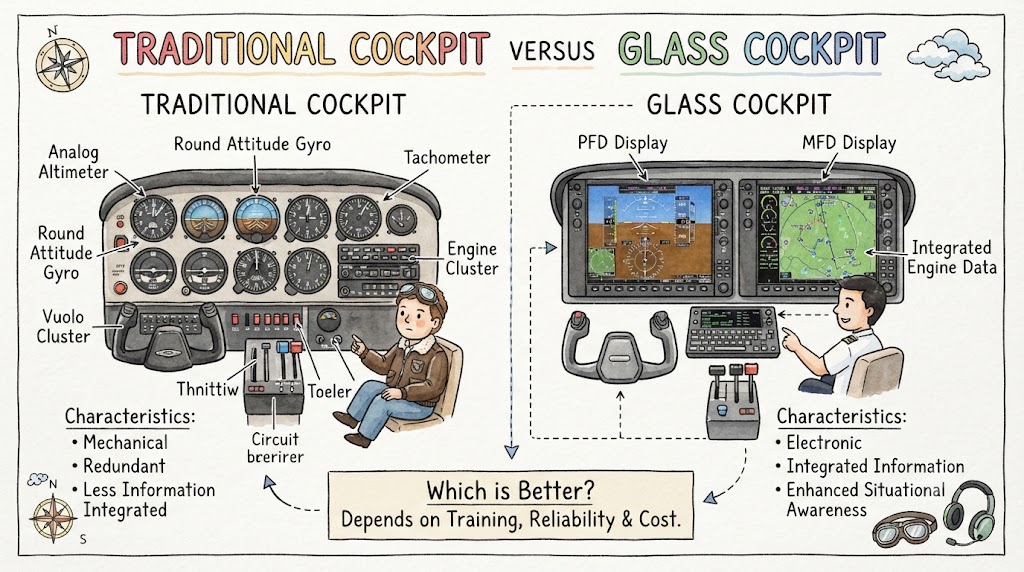
Aircraft cockpits have changed significantly as aviation technology has developed. Older and many training aircraft use a traditional cockpit containing separate mechanical or analogue instruments. Newer aircraft often use a glass cockpit that combines flight, navigation, engine, and system information on electronic displays. Both layouts can provide pilots with the information needed to operate an aircraft safely, but each requires different scanning habits, technical knowledge, and training. Understanding the differences between a traditional cockpit and a glass cockpit helps aviation beginners prepare for flight training and transition between aircraft types.
What Is a Traditional Cockpit?
A traditional cockpit uses separate instruments to show the aircraft’s attitude, airspeed, altitude, heading, vertical speed, engine condition, and navigation information.
These instruments are normally arranged individually across the instrument panel. Many training aircraft use a familiar group of six primary flight instruments commonly called the six-pack.
The six-pack generally includes:
- Airspeed indicator
- Attitude indicator
- Altimeter
- Turn coordinator
- Heading indicator
- Vertical speed indicator
Each instrument has a specific purpose, and the pilot must combine information from several gauges to understand the aircraft’s condition.
Traditional cockpits may also contain:
- Magnetic compass
- Engine pressure and temperature gauges
- Fuel quantity indicators
- Tachometer
- Suction or vacuum gauge
- Navigation indicators
- Communication radios
- Transponder
- Warning lights
- Electrical switches and circuit breakers
The FAA explains that the traditional six flight instruments can be replaced or represented together on an electronic flight display in modern aircraft.
Understanding the Traditional Six-Pack
The six-pack is usually arranged in two rows of three instruments. Although panel layouts can vary, the standard arrangement helps pilots locate important information quickly.
Airspeed Indicator
The airspeed indicator shows the aircraft’s indicated airspeed. Pilots use it when controlling the aircraft during takeoff, climb, cruise, approach, and landing.
It normally includes coloured markings that represent operating ranges. Pilots must understand these markings for the particular aircraft they fly.
Attitude Indicator
The attitude indicator shows the aircraft’s position relative to the horizon. It helps the pilot recognise whether the aircraft is:
- Climbing
- Descending
- Banking left
- Banking right
- Flying approximately level
The attitude indicator is especially important when outside visual references are limited.
Altimeter
The altimeter displays the aircraft’s altitude based on atmospheric pressure. Pilots must set the appropriate pressure value according to applicable procedures and instructions.
Turn Coordinator
The turn coordinator provides information about the aircraft’s rate of turn and coordination. The inclinometer, commonly called the ball, helps the pilot identify slipping or skidding flight.
Heading Indicator
The heading indicator displays the direction in which the aircraft is pointed. Traditional heading indicators may gradually develop an error and therefore require comparison with the magnetic compass according to approved procedures.
Vertical Speed Indicator
The vertical speed indicator shows whether the aircraft is climbing, descending, or maintaining approximately level flight. It generally displays the rate of altitude change in feet per minute.
What Is a Glass Cockpit?
A glass cockpit replaces many separate mechanical instruments with electronic screens. These displays combine important flight and aircraft information in a centralised format.
The traditional six-pack may be presented together on a single liquid-crystal display rather than on six individual instruments.
A glass cockpit commonly includes:
- Primary Flight Display
- Multi-Function Display
- Digital engine-monitoring system
- GPS navigation
- Flight director
- Autopilot controls
- Terrain information
- Traffic information
- Weather information
- Aircraft warning and alert messages
Not every glass cockpit has the same features. The equipment depends on the aircraft model, avionics package, software version, and approved installation.
Primary Flight Display
The Primary Flight Display, or PFD, combines the most important flight instruments on one screen.
A typical PFD may show:
- Aircraft attitude
- Airspeed
- Altitude
- Heading
- Vertical speed
- Navigation guidance
- Flight-director commands
- Autopilot modes
- Selected altitude
- Selected heading
- Wind information
- Navigation source
The PFD often places the attitude display in the centre, airspeed on the left, altitude on the right, and heading information near the bottom.
This integrated layout can reduce the distance that a pilot’s eyes must travel between instruments. However, the pilot still needs a disciplined scan and must avoid staring at one part of the screen.
Multi-Function Display
The Multi-Function Display, or MFD, presents additional flight, navigation, engine, and aircraft-system information.
Depending on the installed system, it may display:
- Moving maps
- Active flight plans
- Airports
- Airspace boundaries
- Navigation points
- Terrain
- Obstacles
- Nearby traffic
- Weather information
- Engine performance
- Fuel information
- System status
- Electronic checklists
FAA training material describes the PFD and MFD as systems that combine flight, navigation, aircraft-system, and situational-awareness information.
Traditional Cockpit Versus Glass Cockpit Comparison
| Area | Traditional cockpit | Glass cockpit |
|---|---|---|
| Instrument presentation | Separate mechanical or analogue instruments | Integrated electronic displays |
| Primary flight information | Spread across several gauges | Concentrated mainly on the PFD |
| Navigation information | Often shown through separate indicators and radios | Frequently integrated with GPS and moving maps |
| Engine information | Separate gauges | Digital engine page or integrated display |
| Pilot scan | Movement between individual instruments | Movement across areas of one or more screens |
| Information volume | Generally limited and direct | Large amount of selectable information |
| Automation | Often limited in basic training aircraft | May include advanced autopilot and flight-director functions |
| Failure effect | May affect one instrument at a time | One display or sensor failure may affect several indications |
| Backup instruments | Main instruments are separate | May include standby instruments or reversionary modes |
| Training focus | Instrument interpretation and aircraft control | Instrument interpretation, information management, and automation |
| Navigation awareness | Requires combining several information sources | Moving maps may improve route awareness |
| Distraction risk | Scattered scanning or instrument fixation | Menu use, programming, and excessive heads-down time |
| Maintenance | Mechanical, vacuum, electrical, or pressure-system servicing | Electronic, software, sensor, and electrical-system servicing |
| Transition difficulty | Requires learning individual instrument behaviour | Requires learning menus, modes, controls, and system logic |
Advantages of a Traditional Cockpit
Simple Instrument Purpose
Each instrument normally has one main function. A pilot can often identify which instrument or supporting system has failed without losing the entire flight display.
Strong Instrument-Scanning Skills
Traditional cockpits encourage students to move their eyes between separate instruments and combine several readings into one understanding of the aircraft’s condition.
This can help students learn the relationship between:
- Aircraft attitude
- Power
- Airspeed
- Altitude
- Heading
- Vertical movement
Direct Presentation
Many traditional instruments present only the information needed for their main function. This can reduce the amount of information competing for the pilot’s attention.
Useful Foundation for Training
Learning on traditional instruments may help students understand what each flight instrument measures and how different aircraft systems support those instruments.
Individual Instrument Failures
A malfunction may sometimes be limited to one instrument or one supporting system. However, related instruments can still be affected when they share a common vacuum, pressure, electrical, or sensor source.
Limitations of a Traditional Cockpit
Information Is Spread Across the Panel
The pilot must look at several locations to build a complete picture of the aircraft’s attitude, performance, navigation status, and engine condition.
Limited Situational-Awareness Features
Basic traditional cockpits may not provide integrated moving maps, terrain displays, traffic information, or graphical weather.
Greater Interpretation Requirement
The pilot must mentally combine information from separate instruments. This requires regular practice and a well-developed scan.
Mechanical Instrument Errors
Traditional instruments may experience:
- Gyroscopic drift
- Vacuum-system failure
- Pitot-static system problems
- Instrument lag
- Friction-related errors
- Electrical failure
The correct response depends on the affected system and aircraft.
Reduced Route Visualisation
Navigation using traditional indicators may require more mental visualisation than navigation using an electronic moving map.
Advantages of a Glass Cockpit
Integrated Flight Information
A PFD combines several primary instruments in one organised display. This can make it easier to observe the relationship between attitude, airspeed, altitude, heading, and vertical speed.
Better Route Awareness
Moving maps can show the aircraft’s position relative to:
- The planned route
- Airports
- Airspace
- Navigation points
- Terrain
- Obstacles
This can improve situational awareness when the information is current, correctly configured, and properly interpreted.
Traffic and Terrain Information
Some glass cockpit systems can display nearby traffic, terrain, or obstacles. These features support pilot awareness but do not replace visual scanning, approved charts, air traffic control instructions, or safe flight planning.
Improved Engine Monitoring
Digital engine displays can present temperatures, pressures, fuel information, and performance trends in an organised format.
Abnormal indications may be highlighted through colours, alerts, or messages, depending on the system.
Automation Integration
Many glass cockpit aircraft include autopilot and flight-director functions. Properly used automation can help pilots manage workload during suitable phases of flight.
Display Flexibility
Some systems allow information to be transferred between displays when one screen becomes unavailable. This is commonly called a reversionary mode.
The exact capability varies by aircraft and must be learned from approved documentation.
Limitations of a Glass Cockpit
Information Overload
A glass cockpit can present a large amount of data, symbols, alerts, menus, and submenus. FAA safety guidance notes that pilots new to glass cockpit avionics may become overwhelmed by the amount of available information.
Beginners should learn essential functions first rather than trying to use every available feature immediately.
Excessive Heads-Down Time
Flight-plan entry, menu selection, map adjustment, and system programming can draw attention away from:
- Aircraft control
- Outside traffic
- Terrain
- Weather
- Radio communication
Complex programming should normally be completed on the ground whenever practical.
Automation Dependence
Pilots may become too dependent on the autopilot, moving map, GPS, or flight director. This can weaken manual flying skills and make it harder to recognise an incorrect automation mode.
FAA guidance emphasises maintaining manual flight-operation skills and avoiding excessive reliance on automation.
Mode Confusion
A pilot may select one automation function while expecting another. The aircraft may then climb, descend, turn, or maintain a value differently from what the pilot intended.
Pilots must confirm both active and armed flight modes.
Multiple Indications Can Be Lost
A single screen failure, sensor failure, or electrical problem may remove several pieces of information at once.
For example, failure of one data source may affect:
- Airspeed
- Altitude
- Vertical speed
- Attitude
- Heading
- Navigation guidance
The actual effect depends on the system design.
False Confidence
A detailed moving map can appear highly accurate even when the wrong route, waypoint, navigation source, or database information is being used.
Pilots must cross-check information rather than blindly following the display.
Instrument Scanning in a Traditional Cockpit
Traditional cockpit scanning requires the pilot to look continuously between individual instruments.
A basic scan generally begins with the attitude indicator and includes regular checks of:
- Airspeed
- Altitude
- Heading
- Vertical speed
- Turn coordination
- Engine instruments
- Navigation instruments
- Outside references
The scan should be continuous and flexible. Pilots should avoid staring at one instrument or skipping an important indication.
Common Traditional Scan Errors
- Fixating on the attitude indicator
- Ignoring the airspeed indicator
- Failing to cross-check altitude
- Chasing small instrument movements
- Forgetting engine gauges
- Depending on one instrument after conflicting indications appear
Students should practise scanning with a qualified instructor.
Instrument Scanning in a Glass Cockpit
A glass cockpit still requires an organised scan even though the information is closer together.
A beginner’s general scan may include:
- Look outside when operating under visual conditions.
- Check aircraft attitude on the PFD.
- Review airspeed and altitude.
- Check heading and vertical speed.
- Confirm the navigation source.
- Review active and armed automation modes.
- Check engine and fuel information.
- Review warnings or advisory messages.
- Return attention outside.
The electronic screen should not become the only point of attention. During visual flight, outside scanning remains essential.
Mechanical Instruments Versus Electronic Displays
Traditional cockpit instruments may receive information through several systems.
These can include:
- Pitot pressure
- Static pressure
- Vacuum pressure
- Gyroscopic movement
- Electrical power
- Mechanical connections
Glass cockpit displays depend on electronic sensors, computers, data networks, and electrical power.
These may include:
- Air data computers
- Attitude and heading reference systems
- Magnetometers
- GPS receivers
- Engine sensors
- Display processors
- Aircraft batteries and alternators
Neither design is free from failure. The failure symptoms and pilot responses are simply different.
Navigation in Traditional and Glass Cockpits
Traditional Navigation
Traditional aircraft may use:
- Magnetic compass
- Heading indicator
- VOR indicator
- Distance-measuring equipment
- Automatic direction finder
- Paper charts
- Visual checkpoints
- Time, speed, and distance calculations
The pilot must often combine several sources to determine position and route progress.
Glass Cockpit Navigation
Glass cockpit aircraft may use GPS and a moving map to show:
- Current aircraft position
- Planned route
- Active waypoint
- Ground track
- Distance to destination
- Estimated arrival time
- Nearby airspace
- Airports and navigation facilities
GPS and moving maps make route monitoring easier, but incorrect programming can create serious navigation errors. Pilots should verify waypoint names, sequence, direction, and route geometry before following electronic guidance.
GPS information may also become unreliable or unavailable because of signal disruption, equipment problems, or incorrect data. FAA guidance advises pilots experiencing a navigation error to use another suitable navigation source and coordinate with air traffic control when necessary.
Automation Differences
Traditional cockpits may have little or no flight automation. Some aircraft may include a basic wing-levelling system or simple autopilot.
Glass cockpit aircraft commonly include more advanced features, such as:
- Heading mode
- Navigation mode
- Altitude hold
- Vertical speed mode
- Flight-level change
- Approach mode
- Flight director
- Coupled GPS navigation
Automation can reduce workload, but it also creates new responsibilities.
The pilot must understand:
- Which mode is active
- Which mode is armed
- What the system is controlling
- What the aircraft will do next
- How to disconnect the system
- How to return to manual flight
Even when the autopilot is controlling the aircraft, the pilot remains responsible for monitoring the flight path and intervening when required.
Failure Awareness in Traditional Cockpits
Possible traditional cockpit failures include:
- Blocked pitot tube
- Blocked static port
- Vacuum-system failure
- Electrical-system failure
- Gyroscopic instrument failure
- Heading-indicator drift
- Instrument sticking
- Broken mechanical connection
A pilot may notice a failure when one instrument disagrees with the others or behaves unexpectedly.
Pilots must understand which instruments share the same source. For example, more than one instrument may be affected by a pitot-static or vacuum-system problem.
Failure Awareness in Glass Cockpits
Possible glass cockpit failures include:
- PFD failure
- MFD failure
- Complete display failure
- Air data computer failure
- Attitude and heading reference failure
- GPS signal loss
- Engine sensor failure
- Electrical-system failure
- Data-network failure
- Frozen or incorrect display information
- Autopilot malfunction
Some aircraft provide backup displays, standby instruments, independent batteries, or reversionary modes.
Failure procedures vary widely. Pilots must follow:
- The approved aircraft flight manual
- The avionics operating guide
- The aircraft checklist
- Instructor guidance
- Applicable aviation regulations
General online information should never replace aircraft-specific failure training.
Transitioning From Traditional to Glass Cockpit
A pilot experienced with traditional instruments should not assume that operating a glass cockpit is simply a matter of reading the same information from a screen.
Transition training should include:
- Display layout
- Flight-plan entry
- Navigation-source selection
- PFD and MFD controls
- Autopilot operation
- Flight-director modes
- Alert interpretation
- Reversionary modes
- Electrical-system knowledge
- Sensor failures
- Partial-panel operation
- Manual flying without automation
Common Transition Challenges
Pilots may initially struggle with:
- Finding information quickly
- Using knobs and menus
- Entering waypoints correctly
- Understanding active and armed modes
- Managing display failures
- Avoiding excessive programming during flight
- Maintaining an outside scan
- Continuing to practise manual flight
The goal of transition training is not only to operate the equipment but also to understand its limitations.
Transitioning From Glass Cockpit to Traditional Cockpit
A pilot trained mainly on electronic displays may also face challenges when moving to a traditional cockpit.
These may include:
- Reading round-dial instruments
- Developing a wider instrument scan
- Visualising route position without a moving map
- Correcting heading-indicator drift
- Interpreting separate engine gauges
- Using traditional navigation indicators
- Recognising vacuum or mechanical instrument failures
A pilot should receive appropriate familiarisation or instruction before flying an unfamiliar cockpit layout.
Which Cockpit Is Better for Beginners?
There is no single answer for every student.
A traditional cockpit may help a beginner develop a clear understanding of individual instruments, aircraft control, and basic navigation. A glass cockpit may help a beginner learn the systems commonly installed in modern aircraft and improve access to integrated flight information.
The most suitable training aircraft depends on:
- Training goals
- Aircraft availability
- Instructor experience
- Training cost
- Future aircraft plans
- Local operating environment
- Student learning style
- Avionics reliability and support
The quality of instruction and the student’s discipline are more important than the appearance of the instrument panel.
Safety Tips for Both Cockpit Types
Understand the Aircraft
Study the aircraft flight manual, operating handbook, checklists, and avionics documentation.
Maintain an Outside Scan
During visual operations, regularly check traffic, terrain, weather, runway alignment, and aircraft attitude outside.
Cross-Check Information
Do not depend entirely on one instrument, one screen, one sensor, or one navigation source.
Practise Manual Flying
Pilots using advanced automation should continue practising basic aircraft control under suitable conditions and instruction.
Complete Programming Early
Prepare navigation routes and display settings before departure whenever practical.
Use Checklists
Checklists reduce the chance of missing important items during normal, abnormal, and emergency operations.
Learn Failure Indications
Understand how instrument, sensor, electrical, vacuum, GPS, and display failures may appear.
Confirm Automation Modes
Check what the automation is doing rather than assuming it accepted the intended selection.
Avoid Fixation
Move attention between flight instruments, engine information, navigation, communication, and outside references.
Receive Aircraft-Specific Training
Cockpit systems differ considerably. Training on one system does not guarantee proficiency on another.
Practical Training Checklist
Before flying an unfamiliar cockpit, a student should be able to:
- Identify all primary flight instruments
- Locate engine and fuel information
- Find standby instruments
- Explain the main electrical sources
- Identify the navigation source
- Read warning and caution indications
- Enter and verify a basic route
- Recognise active autopilot modes
- Disconnect automation safely
- Explain likely instrument or display failures
- Use the appropriate checklist
- Maintain aircraft control without unnecessary automation
Key Takeaways
- Traditional cockpits use separate mechanical or analogue instruments.
- Glass cockpits combine flight information on electronic displays.
- Traditional panels can help students understand individual instrument functions.
- Glass cockpits provide integrated navigation and situational-awareness information.
- Both cockpit types require disciplined scanning.
- Glass cockpits can create information overload and automation dependence.
- Traditional systems can suffer mechanical, vacuum, pressure, and electrical failures.
- Electronic systems can suffer display, sensor, data, GPS, and electrical failures.
- Moving maps support navigation but must be verified.
- Manual flying skills remain essential in both cockpit types.
- Transition training is important whenever pilots change aircraft or avionics systems.
- Neither cockpit type guarantees safer flight without proper training and judgment.
Frequently Asked Questions
1. What is the main difference between a traditional and glass cockpit?
A traditional cockpit presents flight information through separate mechanical or analogue instruments. A glass cockpit combines much of the same information on electronic screens such as a Primary Flight Display and Multi-Function Display. Glass cockpits may also integrate navigation, engine, traffic, terrain, weather, and automation information.
2. Is a glass cockpit easier to fly?
A glass cockpit can make information easier to access, but it does not automatically make the aircraft easier to fly. Pilots must learn display controls, menus, navigation sources, automation modes, and failure procedures. Without proper instruction, the additional information may increase workload and distraction.
3. What is the traditional six-pack?
The traditional six-pack is a standard group of primary flight instruments. It generally includes the airspeed indicator, attitude indicator, altimeter, turn coordinator, heading indicator, and vertical speed indicator. Pilots scan these instruments together to understand the aircraft’s attitude, direction, altitude, and performance.
4. Can a glass cockpit aircraft be flown after a screen failure?
That depends on the aircraft, equipment, type of failure, remaining displays, standby instruments, weather conditions, and pilot qualifications. Some aircraft offer reversionary display modes or independent backup instruments. Pilots must follow the approved aircraft checklist and receive system-specific failure training.
5. Do traditional cockpits use electricity?
Some traditional instruments are mechanical or pressure-operated, but traditional cockpits also contain electrically powered instruments, radios, lights, and navigation equipment. Other instruments may depend on vacuum or pitot-static systems. Pilots must understand the power or pressure source used by each instrument.
6. Are glass cockpits more accurate than traditional instruments?
Electronic systems can present precise and integrated information, but accuracy depends on properly functioning sensors, computers, databases, and electrical systems. Traditional instruments also have operating errors and limitations. Pilots must understand the limitations of each system and cross-check information when indications appear unreliable.
7. Can pilots become dependent on glass cockpit technology?
Yes. Excessive dependence on GPS, moving maps, autopilot, or flight directors can weaken manual flying and navigation skills. Pilots should continue practising basic aircraft control, traditional navigation concepts, system monitoring, and appropriate responses to automation or display failures.
8. Is it difficult to move from a traditional cockpit to a glass cockpit?
The transition can be challenging because pilots must learn integrated displays, menu structures, flight-plan programming, automation modes, alerts, and failure procedures. Proper ground study, simulator practice, and aircraft-specific instruction can help pilots make the transition safely and confidently.
9. Which cockpit is better for student pilot training?
Both cockpit types can support effective training. Traditional instruments can provide a strong foundation in instrument interpretation and basic navigation. Glass cockpits can prepare students for modern aircraft systems. The best option depends on training goals, aircraft availability, cost, instructor quality, and future flying plans.
10. Do airline aircraft use glass cockpits?
Modern commercial aircraft generally use electronic flight displays and integrated flight-management systems. However, their systems are more complex than those installed in small training aircraft. Airline pilots receive extensive aircraft-specific training in display operation, automation, procedures, system failures, and crew coordination.
Conclusion
Traditional and glass cockpits present similar essential flight information in very different ways. Traditional panels use separate instruments that encourage pilots to develop a broad scan and understand individual instrument functions. Glass cockpits integrate information on electronic displays and can provide advanced navigation, engine, traffic, terrain, and automation features. However, neither system removes the need for manual flying ability, disciplined scanning, sound judgment, cross-checking, and aircraft-specific training. Aircrafto.com helps aviation beginners build a clearer understanding of cockpit instruments, aircraft technology, navigation systems, and safe pilot practices.

