
Introduction
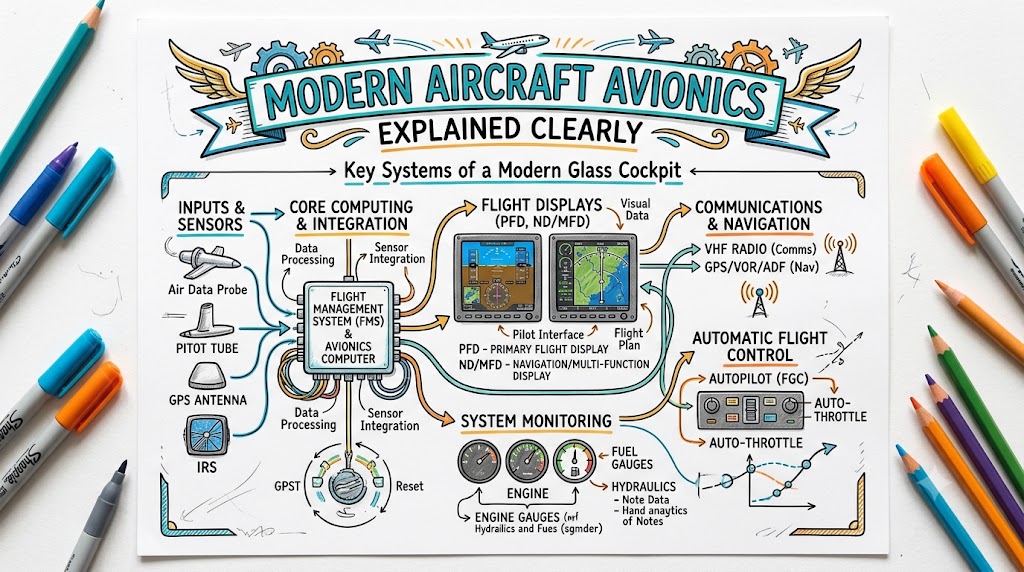
Modern aircraft cockpits contain far more than basic instruments, radios, and navigation equipment. They use interconnected electronic systems that help pilots communicate, navigate, monitor aircraft performance, manage routes, identify weather hazards, and maintain better awareness of the surrounding airspace. These systems are collectively known as modern aircraft avionics.
Older aircraft mainly relied on individual analogue instruments. A pilot had to scan several separate gauges to understand the aircraft’s speed, altitude, attitude, direction, and engine condition. Modern cockpits often present the same information on large digital displays, making it easier to organize and interpret.
However, modern avionics do not replace pilots. They provide information, guidance, warnings, and automation, but pilots must still understand the aircraft, verify the information shown, monitor the flight path, and make safe decisions.
This guide explains the most important avionics systems in clear language and shows how they work together throughout a flight.
What Are Aircraft Avionics?
The word avionics comes from the combination of “aviation” and “electronics.” It refers to the electronic systems used in aircraft, satellites, and other aviation vehicles.
Aircraft avionics systems support several important functions:
- Communication with air traffic control
- Navigation between airports and waypoints
- Monitoring aircraft speed, altitude, and attitude
- Managing flight plans
- Detecting weather, terrain, and nearby traffic
- Controlling or assisting aircraft movement
- Monitoring engines and aircraft systems
- Providing warnings, cautions, and safety information
Avionics can be found in almost every type of aircraft. A small training aircraft may use a GPS navigator, communication radio, transponder, and digital flight display. A commercial airliner may contain several integrated computers, large cockpit displays, weather radar, advanced autopilot functions, and satellite communication systems.
The design and complexity of avionics vary between aircraft, but their basic purpose remains the same: helping pilots operate the aircraft safely and efficiently.
The Evolution of Aircraft Avionics
Early aircraft had only a small number of mechanical instruments. Pilots used basic indicators to monitor airspeed, altitude, engine performance, and direction.
As aviation developed, aircraft began using radio communication and ground-based navigation signals. Pilots could communicate with controllers and follow electronic guidance instead of relying only on maps and visual landmarks.
Later developments included:
- More reliable radio navigation equipment
- Early automatic flight-control systems
- Electronic flight instruments
- Digital engine-monitoring systems
- Satellite-based navigation
- Integrated cockpit displays
- Advanced flight-management computers
Modern aircraft increasingly use a glass cockpit, where information is displayed on electronic screens instead of separate mechanical gauges.
This does not mean that basic instruments are no longer important. Pilots must still understand altitude, airspeed, attitude, heading, vertical speed, and aircraft performance. Modern technology simply presents and combines this information differently.
Main Components of Modern Aircraft Avionics
Modern avionics include many systems. Some provide information, while others support communication, navigation, monitoring, or automatic flight control.
Primary Flight Display
The Primary Flight Display, commonly called the PFD, presents the most important flight information directly in front of the pilot.
A typical PFD shows:
- Aircraft attitude
- Airspeed
- Altitude
- Heading
- Vertical speed
- Flight-director guidance
- Navigation information
- Autopilot status
The attitude display usually appears in the centre. It helps the pilot understand whether the aircraft is climbing, descending, turning, or flying level.
Airspeed is commonly shown on one side of the display, while altitude appears on the other. Heading information is normally displayed near the bottom.
The PFD reduces the need to look at several separate instruments. However, pilots must learn how the information is arranged and how to recognize incorrect or unreliable indications.
Multi-Function Display
The Multi-Function Display, or MFD, provides additional information that supports navigation and aircraft monitoring.
Depending on the aircraft, the MFD may show:
- Moving navigation maps
- Flight-plan routes
- Airports and waypoints
- Terrain information
- Weather information
- Nearby aircraft
- Engine data
- Fuel information
- Electrical and hydraulic systems
- Electronic checklists
Pilots can often change the display according to the phase of flight. During cruise, they may select a navigation map and weather information. During an abnormal situation, they may use the display to review aircraft-system information.
The MFD improves situational awareness, but pilots must avoid spending too much time looking inside the cockpit.
Flight Management System
The Flight Management System, commonly known as the FMS, helps pilots plan and manage the aircraft’s route and performance.
The FMS can support:
- Flight-plan entry
- Route selection
- Waypoint management
- Fuel calculations
- Estimated arrival times
- Climb and descent planning
- Aircraft performance calculations
- Navigation guidance
Before departure, pilots may enter the planned route, departure procedure, destination, and approach. The system then organizes the information into a flight plan.
During flight, the FMS works with other navigation and display systems to show the aircraft’s position and guide it along the selected route.
The FMS is highly useful, but it is only as reliable as the data entered into it. A wrong airport code, runway, waypoint, altitude, or route can lead to incorrect guidance.
For this reason, pilots must check every important entry and compare the programmed route with the approved flight plan.
Global Navigation Satellite Systems
Satellite navigation systems help calculate an aircraft’s position using signals received from satellites.
GPS is the most widely recognized example, but other global and regional satellite systems also support navigation.
Satellite navigation can help pilots determine:
- Current position
- Ground speed
- Direction of travel
- Distance to a waypoint
- Estimated time of arrival
- Flight-path accuracy
Modern cockpit systems can display the aircraft’s position on a moving map, making route awareness easier.
However, satellite navigation signals can be affected by interference, equipment problems, incorrect databases, or signal loss. Pilots must know how to identify unreliable information and use suitable backup navigation methods.
Inertial Navigation System
An Inertial Navigation System, or INS, calculates aircraft movement using internal sensors.
It detects changes in:
- Acceleration
- Direction
- Attitude
- Speed
- Position
Unlike satellite navigation, an inertial system does not depend entirely on external radio signals. This makes it valuable during long-distance flights and in areas where external navigation signals may be limited.
However, inertial systems can slowly develop position errors over time. Modern aircraft often combine inertial information with satellite navigation to improve accuracy.
Communication Systems
Aircraft communication systems allow pilots to exchange information with air traffic control, airline operations, airport services, and other aviation organizations.
VHF Communication
Very High Frequency communication is widely used for normal voice communication between pilots and air traffic controllers.
It is commonly used during:
- Ground operations
- Departure
- En-route flight
- Arrival
- Approach
- Landing
VHF communication generally works within line-of-sight range.
HF Communication
High Frequency communication can cover much longer distances than VHF. It is often used during oceanic or remote-area operations where normal VHF coverage is unavailable.
Satellite Communication
Satellite communication can support voice and data exchange over long distances. It is particularly useful where ground-based communication coverage is limited.
Data-Link Communication
Data-link systems allow pilots and controllers to exchange written messages electronically.
These messages may include:
- Route clearances
- Altitude instructions
- Position reports
- Weather information
- Operational messages
Data-link communication can reduce radio congestion and misunderstanding, but pilots must still read and confirm every message carefully.
Transponders
A transponder responds to signals from air traffic surveillance systems. It helps controllers identify and track an aircraft.
Modern transponders can provide information such as:
- Aircraft identity
- Pressure altitude
- Position
- Speed
- Direction
Transponders also support traffic-awareness systems used by nearby aircraft.
Automatic Flight Control System
An Automatic Flight Control System helps control the aircraft and reduce pilot workload.
Several related systems may be included.
Autopilot
The autopilot can control selected aspects of the aircraft’s flight path. Depending on the aircraft, it may maintain:
- Heading
- Altitude
- Vertical speed
- Airspeed
- Navigation route
- Approach path
The pilot selects or confirms the desired mode, and the autopilot follows the related commands.
Flight Director
The flight director provides visual guidance on the Primary Flight Display. It shows the control inputs required to follow a selected heading, altitude, speed, or route.
The pilot may follow the flight-director guidance manually, or the autopilot may follow it automatically.
Autothrottle or Autothrust
Autothrottle or autothrust systems adjust engine power to maintain a selected speed or thrust setting.
These systems can reduce workload, especially during climb, cruise, approach, and landing.
Understanding Automation Modes
One of the most important pilot responsibilities is knowing which automation mode is active.
An aircraft may be maintaining altitude when the pilot expects it to descend, or it may be following a heading instead of the programmed route. Such situations can occur when the selected mode is misunderstood.
Pilots must continuously ask:
- What is the system doing?
- Why is it doing that?
- What will it do next?
Automation supports pilots, but it does not remove the need for monitoring.
Weather Radar
Airborne weather radar helps pilots detect precipitation and identify areas that may contain hazardous weather.
The radar display may show different levels of detected precipitation. Pilots use this information to avoid potentially dangerous conditions.
Weather radar can support decisions involving:
- Thunderstorm avoidance
- Route changes
- Turbulence awareness
- Approach planning
- Diversion planning
However, weather radar requires correct setup and interpretation. It does not show every atmospheric hazard, and it should never be treated as permission to fly through severe weather.
Pilots must combine radar information with forecasts, reports, visual observations, and air traffic information.
Traffic Collision Avoidance System
A Traffic Collision Avoidance System helps pilots identify nearby aircraft that may create a collision risk.
The system receives information from aircraft transponders and analyzes their relative positions.
It may provide:
- Traffic information
- Caution alerts
- Collision warnings
- Vertical avoidance instructions
If the system determines that another aircraft is dangerously close, it may instruct one aircraft to climb and the other to descend.
Pilots receive specific training on how to respond to these alerts. Correct and immediate action can be essential.
Terrain Awareness and Warning System
A Terrain Awareness and Warning System helps reduce the risk of an aircraft unintentionally flying into terrain.
The system compares the aircraft’s position, altitude, speed, and direction with stored terrain information.
It can warn pilots about:
- Rising terrain
- Mountains
- Unsafe descent rates
- Low altitude
- Terrain near the projected flight path
These warnings improve situational awareness, particularly during poor visibility, night operations, and flight near mountainous areas.
Pilots must respond according to their training, approved procedures, and aircraft guidance.
Engine and Aircraft-System Monitoring
Modern avionics allow pilots to monitor engines and aircraft systems through electronic displays.
Information may include:
- Engine temperature
- Engine pressure
- Fuel flow
- Fuel quantity
- Oil pressure
- Electrical power
- Hydraulic pressure
- Cabin pressurization
- Flight-control status
Commercial aircraft often use centralized systems that display normal information, cautions, warnings, and recommended actions.
Instead of scanning many individual gauges, pilots can identify system problems through organized displays.
However, pilots must understand what the messages mean. A warning should not simply be cleared or ignored without determining its cause.
Traditional Cockpit Versus Glass Cockpit
| Area | Traditional Cockpit | Modern Glass Cockpit |
|---|---|---|
| Instrument presentation | Separate analogue instruments | Integrated digital displays |
| Navigation | Individual radio-navigation equipment | Moving maps and programmed routes |
| Aircraft monitoring | Multiple gauges and indicators | Centralized system pages |
| Pilot workload | More manual interpretation | More automation and integration |
| Information access | Distributed across the cockpit | Consolidated on fewer displays |
| Failure response | Individual instrument failures | Display, sensor, or data-source failures |
| Training requirement | Strong instrument-scanning skills | Strong system-management skills |
| Route awareness | Charts and separate navigation indicators | Graphical route presentation |
A glass cockpit can make information easier to access, but it also introduces new training requirements.
Pilots must learn:
- Display organization
- Menu structures
- Data entry
- Automation modes
- Failure indications
- Reversionary or backup displays
Basic flying skills remain necessary in both traditional and modern cockpits.
How Avionics Work Together During a Flight
Avionics are most useful when their information and functions work together.
Pre-Flight Preparation
Before departure, pilots review the route, weather, aircraft condition, fuel requirements, airport information, and operational limitations.
They may then enter the flight plan into the Flight Management System.
The programmed route should be checked against the approved flight plan. Pilots must confirm the departure airport, runway, route, destination, approach, and important altitude restrictions.
Engine Start and Taxi
During engine start, electronic displays help pilots monitor engine parameters and aircraft systems.
While taxiing, pilots use:
- Airport charts
- Ground communication
- Navigation displays
- Aircraft-system indications
- Checklists
The main priority remains safely controlling the aircraft and maintaining awareness of other traffic and airport signs.
Takeoff
During takeoff, the Primary Flight Display provides airspeed, attitude, altitude, and flight-director guidance.
Engine displays help pilots confirm that the engines are operating normally.
The communication system keeps the pilots connected with air traffic control.
Climb
After takeoff, the aircraft may follow a programmed departure route.
The autopilot may be engaged when permitted. The Flight Management System, navigation sensors, autopilot, and displays then work together to guide the aircraft.
Pilots continue to monitor:
- Aircraft speed
- Climb rate
- Navigation path
- Weather
- Traffic
- Engine performance
Cruise
During cruise, avionics help maintain the route, altitude, speed, and fuel plan.
Pilots monitor weather radar, navigation information, communication messages, engine performance, and nearby traffic.
Although automation may handle much of the routine flight control, pilots remain responsible for supervision.
Descent
Before descent, pilots review the arrival route, weather, runway, approach, landing performance, and possible alternatives.
The FMS may calculate a descent path, but the pilots must verify that it is suitable.
Air traffic control instructions may require changes to the planned route or altitude.
Approach
During approach, pilots use navigation information, flight displays, communication systems, weather reports, and aircraft configuration information.
The autopilot and flight director may assist with approach guidance, but the pilots must confirm that the aircraft is following the correct path.
Landing
During landing, avionics continue to provide speed, altitude, attitude, navigation guidance, engine information, and warnings.
After touchdown, pilots use ground communication, airport information, and aircraft-system displays while taxiing to the parking area.
Benefits of Modern Aircraft Avionics
Modern avionics offer several important benefits.
Improved Situational Awareness
Pilots can see the aircraft’s position, route, weather, terrain, and nearby traffic in a more organized format.
Accurate Navigation
Satellite navigation and integrated flight-management systems support precise route tracking.
Reduced Workload
Autopilot, flight directors, electronic checklists, and organized displays reduce some routine tasks.
Better Communication
Voice, satellite, and data-link systems make it easier to exchange information with controllers and operations teams.
Early Detection of Problems
Electronic monitoring systems can identify abnormal conditions and present warnings before they become more serious.
Improved Flight Efficiency
Accurate route planning, performance calculations, and engine monitoring can support better fuel management and more efficient operations.
More Consistent Flight-Path Management
Automation can help maintain selected speeds, headings, altitudes, and routes accurately when correctly programmed and monitored.
Limitations and Risks of Modern Avionics
Avionics improve aviation, but they also introduce risks.
Incorrect Data Entry
A system may follow an incorrect route perfectly if the pilot enters the wrong information.
Every important entry should be checked.
System Failures
Displays, sensors, computers, antennas, or power sources can fail.
Pilots must know which backup systems are available.
GPS Interference or Loss
Satellite signals may become unavailable or unreliable.
Pilots should understand alternative navigation methods and failure indications.
Database Problems
Navigation databases may contain outdated information if they have not been updated correctly.
Pilots must confirm that the required data are current and suitable.
Automation Complacency
Automation complacency occurs when pilots trust automated systems so much that they stop actively monitoring the aircraft.
The system may continue operating normally while following an incorrect command.
Mode Confusion
Mode confusion occurs when pilots misunderstand what the autopilot or flight-management system is controlling.
The aircraft may climb, descend, turn, or accelerate differently from what the crew expects.
Loss of Manual Flying Skills
Excessive dependence on automation can reduce manual flying confidence and ability.
Regular manual flying practice is important when conditions, procedures, and company policies allow it.
Excessive Attention Inside the Cockpit
Programming or troubleshooting avionics can distract pilots from traffic, terrain, weather, and aircraft control.
Tasks should be managed according to their priority.
Avionics and Flight Safety
Modern avionics support safety by giving pilots more accurate and organized information.
Safety-related functions include:
- Terrain warnings
- Traffic alerts
- Weather detection
- Navigation guidance
- Engine monitoring
- System warnings
- Communication with controllers
- Flight-path control
However, safety does not come from technology alone.
Safe operation still depends on:
- Correct training
- Checklist discipline
- Proper planning
- Clear communication
- Situational awareness
- Manual flying ability
- Sound decision-making
- Effective monitoring
A pilot should never assume that a system is correct simply because it is electronic.
What Student Pilots Should Learn About Avionics
Student pilots should build a strong foundation before depending on advanced systems.
Learn Basic Instruments First
Understand airspeed, altitude, attitude, heading, and vertical speed before relying on integrated displays.
Understand the Information
Do not simply memorize button sequences. Learn what the system is showing and why the information matters.
Verify Every Flight Plan
Check airports, runways, waypoints, headings, distances, and route order.
Learn Automation Modes
Understand which mode is active, what it controls, and how to disconnect it.
Maintain an Outside Scan
Do not spend excessive time looking at displays, especially during visual flight.
Practise Manual Flying
Technology should support flying skills, not replace them.
Learn Backup Procedures
Know what to do if a display, GPS receiver, communication radio, or sensor fails.
Use Approved References
Aircraft-specific procedures should come from the approved flight manual, operating handbook, checklist, training program, or instructor.
Common Avionics Mistakes Made by Beginners
Entering the Wrong Waypoint
A similar airport or waypoint code may be selected by mistake.
Prevention: Compare every entry with the planned route and chart.
Selecting the Wrong Autopilot Mode
The aircraft may maintain heading when the pilot expects it to follow the navigation route.
Prevention: Confirm the active and armed modes after every selection.
Failing to Check the Active Flight-Plan Leg
The system may guide the aircraft toward an unexpected waypoint.
Prevention: Review the active leg before departure and after route changes.
Depending Completely on GPS
A pilot may lose awareness of location if the GPS becomes unavailable.
Prevention: Maintain basic navigation knowledge and use suitable backup references.
Ignoring Unexpected Indications
A pilot may assume that unusual information is only a display problem.
Prevention: Cross-check the information and investigate the cause.
Spending Too Much Time Programming
Long periods of attention inside the cockpit can reduce traffic awareness.
Prevention: Complete as much programming as possible before departure and avoid unnecessary changes during high-workload phases.
Failing to Monitor the Actual Flight Path
The system may be operating correctly but following an incorrectly entered command.
Prevention: Compare the aircraft’s movement with the expected route, altitude, and speed.
Forgetting That Automation Can Be Disconnected
A pilot may continue trying to correct an automation problem through menus.
Prevention: When appropriate and safe, return to basic manual control and simplify the situation.
The Future of Aircraft Avionics
Aircraft avionics will continue to become more integrated, connected, and capable.
Possible developments include:
- Larger and more adaptable cockpit displays
- Improved satellite navigation
- Better data-link communication
- Advanced vision systems
- Predictive aircraft maintenance
- More accurate weather information
- Artificial intelligence-assisted monitoring
- Improved cybersecurity
- Greater support for electric aircraft
- Increased automation in selected operations
Artificial intelligence may help identify unusual system behaviour, organize information, and support decision-making. However, aviation authorities, manufacturers, and operators must ensure that such systems are predictable, testable, and safe.
Cybersecurity will also become more important as aircraft systems exchange larger amounts of digital information.
Future cockpits may contain more automation, but pilots will still need strong technical understanding, decision-making skills, and the ability to manage unexpected situations.
Frequently Asked Questions
1. What does avionics mean in aviation?
Avionics refers to the electronic systems used in aircraft. These systems support communication, navigation, aircraft monitoring, weather detection, flight control, traffic awareness, terrain warning, and other operational functions. The complexity of avionics depends on the aircraft and its intended use.
2. What are the main avionics systems in an aircraft?
Common avionics include communication radios, navigation equipment, transponders, flight displays, GPS receivers, Flight Management Systems, autopilot systems, weather radar, traffic-alerting systems, terrain-warning systems, and electronic engine-monitoring displays.
3. What is a glass cockpit?
A glass cockpit uses electronic screens to display flight, navigation, engine, and aircraft-system information. It replaces many separate mechanical gauges with integrated digital displays such as the Primary Flight Display and Multi-Function Display.
4. How does a Flight Management System work?
A Flight Management System stores and manages route and performance information. Pilots enter the flight plan, and the system works with navigation sensors, cockpit displays, and automatic flight controls to guide the aircraft along the selected route.
5. Is autopilot considered an avionics system?
Yes. Autopilot is part of the aircraft’s automatic flight-control system. It can control selected aspects of the flight path, such as heading, altitude, vertical speed, and navigation tracking. Pilots must select the correct modes and monitor its operation.
6. Can an aircraft fly safely if some avionics fail?
Many aircraft have backup instruments, duplicate systems, alternative power sources, and failure procedures. Whether a flight can continue safely depends on the failed equipment, weather, regulations, aircraft design, and available alternatives. Pilots must follow approved procedures.
7. What is the difference between GPS and an Inertial Navigation System?
GPS calculates position using signals from satellites. An Inertial Navigation System uses internal sensors to measure movement and calculate position. Modern aircraft may combine both systems to improve reliability and accuracy.
8. Do student pilots need avionics training?
Yes. Student pilots should learn how to interpret displays, enter and verify routes, use communication equipment, understand automation modes, recognize failures, and maintain situational awareness. Training should be completed under the guidance of a qualified instructor.
9. Can pilots become too dependent on cockpit automation?
Yes. Excessive dependence can lead to automation complacency, reduced monitoring, weaker manual flying skills, and confusion about system modes. Pilots should understand the automation, monitor it actively, and remain prepared to fly manually.
10. What avionics are commonly found in small training aircraft?
Small training aircraft may include communication radios, a transponder, GPS navigation, digital flight displays, engine-monitoring equipment, traffic information, and sometimes an autopilot. The exact equipment varies between aircraft and flight schools.
Conclusion
Modern aircraft avionics improve navigation, communication, flight-path control, aircraft monitoring, weather awareness, and operational efficiency by presenting pilots with organized information and useful automation. However, these systems are most effective when pilots understand how they work, verify entered information, monitor every active mode, maintain manual flying skills, and follow approved aircraft documentation and instructor guidance.

