
Introduction
Modern aircraft cockpits can look very different from the instrument panels used in older airplanes. Instead of relying mainly on separate mechanical gauges, many aircraft now present flight, navigation, engine, traffic, terrain, and weather information on electronic screens. This arrangement is commonly called a glass cockpit. For aviation beginners, learning how these displays work is an important part of understanding modern aircraft, but technology must always support—not replace—basic flying knowledge, manual control skills, sound judgment, and proper instruction.
What Is a Glass Cockpit?
A glass cockpit is an aircraft cockpit that uses electronic flight displays to present important information to the pilot. A traditional cockpit normally contains numerous individual mechanical or analogue instruments, while a glass cockpit combines much of that information on one or more computer screens.
According to the Federal Aviation Administration, electronic displays can simplify the presentation of aircraft and navigation information by allowing pilots to focus on the details most relevant to the current phase of flight.
The word “glass” does not mean that every instrument has disappeared. Some aircraft still include standby instruments, separate radios, switches, circuit breakers, and physical engine controls. The exact arrangement depends on the aircraft model and installed avionics.
A glass cockpit may display:
- Aircraft attitude
- Airspeed
- Altitude
- Heading
- Vertical speed
- Navigation routes
- Engine information
- Terrain and obstacle data
- Traffic information
- Weather information
- Autopilot modes
- System warnings and alerts
Not every glass cockpit includes all these functions. Pilots must learn the specific system installed in the aircraft they intend to fly.
Main Components of a Glass Cockpit
Although cockpit layouts differ, most modern systems include several common components.
| Component | Main purpose |
|---|---|
| Primary Flight Display | Presents essential flight and navigation information |
| Multi-Function Display | Shows maps, routes, terrain, traffic, weather, and system data |
| Engine Display | Presents engine performance and related system indications |
| GPS Navigator | Determines position and supports route navigation |
| Flight Management System | Helps pilots enter and manage flight-plan information |
| Flight Director | Provides visual guidance for maintaining a selected flight path |
| Autopilot | Controls selected aircraft movements when properly engaged |
| Communication System | Supports communication with air traffic control and other stations |
| Alerting System | Warns pilots about important aircraft or environmental conditions |
| Standby Instruments | Provide essential information if a primary system becomes unavailable |
Understanding the Primary Flight Display
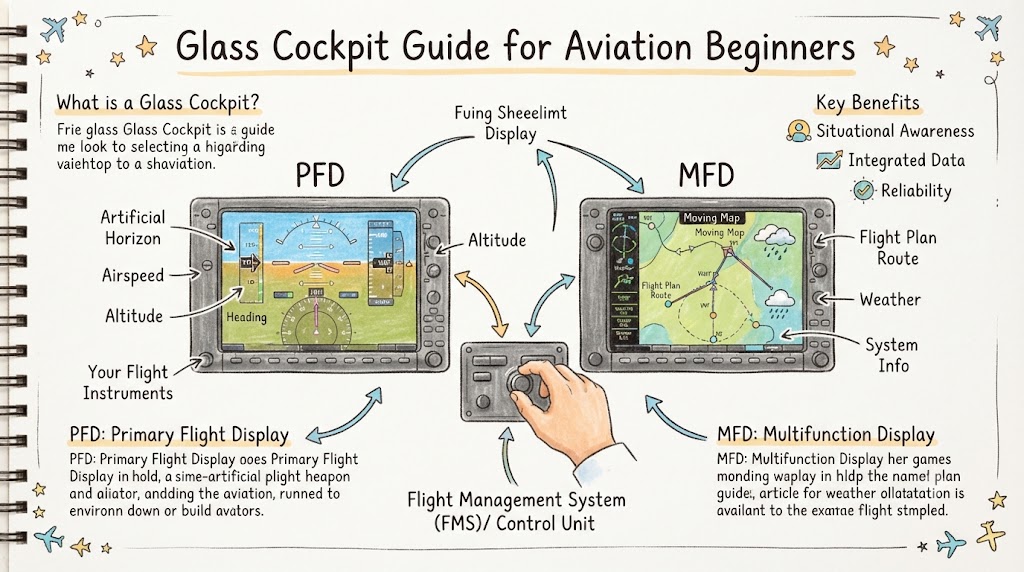
The Primary Flight Display, commonly called the PFD, places the main flight instruments in one central area. It generally combines information that would otherwise appear on several separate gauges.
A typical PFD may show:
- Aircraft pitch and bank
- Indicated airspeed
- Barometric altitude
- Vertical speed
- Magnetic or directional heading
- Course guidance
- Flight-director commands
- Selected autopilot settings
- Navigation source
- Slip or skid information
The attitude display usually occupies the centre of the screen. Airspeed may appear as a vertical tape on one side, while altitude appears on the other. Heading information is often presented below the attitude display.
The FAA describes a PFD as a display that combines the primary flight instruments with navigation and situational-awareness information. (FAA)
Why the PFD Helps Beginners
Placing related information close together may reduce the amount of eye movement required between widely separated instruments. However, beginners still need to develop a disciplined scan.
A pilot should not stare only at the attitude display. Airspeed, altitude, heading, vertical speed, navigation indications, engine information, external conditions, and other relevant sources must still be cross-checked.
Understanding the Multi-Function Display
The Multi-Function Display, or MFD, normally presents navigation, aircraft-system, and situational-awareness information.
Depending on the equipment installed, it may show:
- A moving map
- Active flight plan
- Airports and navigation facilities
- Airspace boundaries
- Terrain and obstacles
- Nearby traffic
- Weather information
- Engine data
- Fuel calculations
- Checklists
- System status pages
The MFD can help pilots understand where the aircraft is, where it is going, and what may be located along the route. The FAA broadly defines an MFD as an electronic display combining navigation, system, and situational-awareness information. (FAA)
Important Limitation
The MFD is only as reliable as its inputs, configuration, database, sensors, and the pilot’s understanding of the information.
A colourful moving map can look convincing even when:
- The wrong waypoint has been entered
- The wrong navigation source is selected
- A database is outdated
- The displayed route is not the cleared route
- A sensor is providing incorrect information
- The pilot has misunderstood the selected mode
Pilots must verify information instead of accepting every display indication without question.
Traditional Cockpit Versus Glass Cockpit
| Area | Traditional cockpit | Glass cockpit |
|---|---|---|
| Instrument presentation | Separate mechanical or analogue gauges | Integrated electronic displays |
| Flight information | Distributed across the panel | Concentrated mainly on the PFD |
| Navigation | Often uses separate radios and indicators | Frequently integrated with GPS and moving maps |
| Engine monitoring | Individual gauges | Digital values, graphics, or engine pages |
| Information volume | Usually more limited | Can present large amounts of information |
| Pilot interaction | Knobs, switches, and separate instruments | Knobs, buttons, menus, soft keys, and touch controls |
| Failure response | Failure may affect an individual instrument | A display or data-source failure may affect several indications |
| Training needs | Requires strong instrument interpretation | Requires instrument knowledge and system-management skills |
| Main distraction risk | Scattered instrument scan | Excessive menu use or heads-down time |
| Backup equipment | Depends on aircraft design | May include standby or reversionary displays |
Neither cockpit style automatically makes a pilot safer. Safe operation depends on training, preparation, system knowledge, attention management, and correct decision-making.
Benefits of Glass Cockpit Technology
Integrated Information
A glass cockpit can bring flight, navigation, engine, and aircraft-system information into a coordinated display environment. This may help pilots recognise relationships between different pieces of information.
Improved Route Awareness
Moving maps can help pilots visualise their position, planned route, nearby airports, airspace, and navigation points.
Clearer Trend Information
Speed and altitude tapes may show trends that help a pilot recognise whether a value is increasing or decreasing. Engine displays can also make abnormal readings more noticeable when properly configured.
Terrain and Traffic Awareness
Some systems can present terrain, obstacles, and traffic information. These tools may improve awareness, but they do not give pilots permission to reduce visual scanning, ignore air traffic control instructions, or enter unsafe conditions.
Workload Support
Automation and integrated displays can reduce workload during suitable phases of flight. The FAA also warns that overdependence can create hazards such as automation fixation, excessive heads-down time, degraded manual skills, and failure to recognise system limitations.
Common Challenges for Aviation Beginners
Information Overload
A glass cockpit can display more information than a beginner can comfortably process. Trying to monitor every symbol, number, map feature, and message at once may increase confusion.
The solution is not to memorise the entire system immediately. Students should learn essential functions first and add more advanced functions gradually.
Excessive Heads-Down Time
Entering routes, changing pages, searching menus, or correcting an error can draw attention away from aircraft control and the outside environment.
Whenever practical, complicated programming should be completed on the ground rather than during a demanding phase of flight.
Automation Confusion
Pilots may select a mode without fully understanding what it will command. A pilot who expects the aircraft to climb may discover that the selected mode is controlling only pitch, altitude, heading, or navigation in an unexpected way.
Display Fixation
Fixation means concentrating on one instrument or display while ignoring other important information. The FAA identifies fixation and omission as common instrument-scanning errors. (FAA)
Overconfidence
Advanced displays can make navigation appear simple. However, a pilot still needs to understand aircraft control, weather, airspace, fuel planning, communications, navigation principles, and emergency procedures.
A Simple Glass Cockpit Scanning Method
There is no single scan that applies perfectly to every aircraft and situation. Beginners should develop their scan with a qualified instructor.
A general scan may include:
- Look outside: Check attitude references, traffic, terrain, weather, and aircraft direction when operating visually.
- Check the PFD: Review attitude, airspeed, altitude, heading, and vertical movement.
- Verify navigation: Confirm the navigation source, selected course, active waypoint, and flight path.
- Review engine information: Check engine indications and fuel status.
- Confirm automation: Identify every active and armed mode.
- Check alerts: Review messages or warnings without becoming fixated.
- Return outside: Continue a regular outside scan where conditions require it.
The purpose is to create a continuous cycle rather than staring at one area.
Understanding Cockpit Automation
Automation may include a flight director, autopilot, GPS navigator, flight-management features, automatic trim functions, or coupled navigation.
Beginners should clearly understand the difference between the flight director and autopilot.
Flight Director
A flight director normally presents command bars or guidance cues on the PFD. It shows the pilot the attitude or control direction needed to follow a selected mode.
The pilot must either follow those commands manually or use an autopilot capable of following them.
Autopilot
An autopilot can control certain aircraft movements when engaged. Depending on the system, it may control:
- Heading
- Selected navigation course
- Pitch
- Vertical speed
- Altitude
- Approach guidance
An autopilot does not take full responsibility for the flight. The pilot remains responsible for monitoring the aircraft, selecting appropriate modes, checking the flight path, and intervening when necessary.
The Three Automation Questions
A useful beginner habit is to ask:
- What is the automation doing now?
- Why is it doing that?
- What will it do next?
When the answers are unclear, the pilot may not have enough understanding to continue relying on the selected automation mode.
The FAA recommends maintaining manual-control proficiency and receiving specialised transition training when moving into technically advanced or unfamiliar aircraft.
Common Glass Cockpit Mistakes
| Mistake | General prevention |
|---|---|
| Entering the wrong waypoint | Verify identifiers, sequence, distance, and direction |
| Selecting the wrong navigation source | Confirm the active source before following guidance |
| Ignoring the mode annunciator | Read and verbally confirm active and armed modes |
| Spending too long inside menus | Complete programming early and maintain aircraft control |
| Trusting the moving map completely | Cross-check position using all appropriate information |
| Ignoring alerts | Understand alert priority and follow approved procedures |
| Allowing manual skills to weaken | Practise hand-flying under suitable instruction |
| Failing to check database status | Review database validity and operational limitations |
| Misreading similar controls | Use deliberate control selection and verify the result |
| Skipping failure training | Practise approved abnormal scenarios with an instructor |
Preparing for a Glass Cockpit Training Flight
A student can learn more effectively by preparing before entering the aircraft.
Pre-Flight Learning Checklist
- Read the aircraft’s approved flight manual
- Review the avionics manufacturer’s operating guide
- Identify the PFD, MFD, audio panel, autopilot, and standby instruments
- Learn the locations of major controls and knobs
- Understand the main display pages
- Review common symbols and colours
- Learn how the navigation source is identified
- Review autopilot and flight-director mode indications
- Understand the system’s normal start-up checks
- Discuss likely failure scenarios with the instructor
- Practise flight-plan entry on an approved training device
- Prepare the route before engine start when practical
Students should avoid learning only through unsupervised button pressing. A system may respond differently depending on the aircraft configuration, software version, selected navigation source, or current flight phase.
Glass Cockpit Failure Awareness
Electronic displays are reliable tools, but failures can occur. A failure may involve the screen itself, electrical power, a sensor, a navigation receiver, a data network, or another supporting component.
Possible situations include:
- Loss of one display
- Loss of all primary displays
- Incorrect attitude information
- Air-data failure
- Heading failure
- GPS signal loss
- Engine-data loss
- Autopilot disconnection
- Frozen or delayed information
- Conflicting indications
- Electrical-system malfunction
Some aircraft allow information to be transferred to another display through a reversionary mode. Others rely on dedicated standby instruments.
The correct response varies significantly between aircraft. Pilots must use the approved checklist and aircraft documentation rather than depending on a general internet article.
Maintaining Basic Flying Skills
Glass cockpit training should not focus only on learning menus and buttons. A student pilot still needs strong foundational abilities.
These include:
- Maintaining aircraft attitude
- Controlling airspeed and altitude
- Flying coordinated turns
- Trimming correctly
- Navigating using appropriate methods
- Monitoring fuel
- Communicating clearly
- Interpreting weather
- Managing workload
- Making safe decisions
- Responding to abnormal situations
- Flying without unnecessary automation
The FAA advises pilots not to allow automation to degrade manual aircraft-control skills and states that no single automation level is appropriate for every flight situation.
Practical Tips for Learning Glass Cockpit Systems
Learn One Function at a Time
Begin with essential information such as attitude, airspeed, altitude, heading, and basic navigation. Add advanced pages only after the fundamentals are comfortable.
Practise on the Ground
Ground practice allows students to explore menus without dividing attention between programming and aircraft control.
Use Realistic Scenarios
Practise building routes, changing destinations, reviewing alerts, and managing unexpected changes under instructor supervision.
Confirm Every Change
After pressing a button or turning a knob, check what changed. Never assume the system accepted the intended command.
Verbalise Automation Modes
Saying the active mode aloud can help a pilot detect differences between what was selected and what actually became active.
Keep Looking Outside
During visual flight, cockpit screens must not replace traffic scanning, horizon awareness, weather observation, or terrain avoidance.
Review Each Training Flight
After landing, discuss:
- Which features were difficult
- Where excessive heads-down time occurred
- Which modes created confusion
- Whether the scan remained balanced
- What should be practised before the next flight
Glass Cockpit Safety Best Practices
Safe glass cockpit operation depends on disciplined habits:
- Know the system before using advanced features
- Maintain manual aircraft-control proficiency
- Verify route and waypoint entries
- Monitor active automation modes
- Cross-check electronic information
- Keep databases appropriately current
- Avoid unnecessary programming during critical phases
- Use checklists
- Understand display and sensor limitations
- Prepare for partial and complete failures
- Receive aircraft-specific instruction
- Remain within personal, regulatory, and aircraft limits
Technology should increase useful awareness, not create false confidence.
Future of Digital Flight Decks
Digital cockpits continue to develop through higher-resolution displays, synthetic vision, enhanced engine monitoring, electronic checklists, improved connectivity, and more integrated traffic and weather information.
Future systems may make information easier to interpret, but more capability also creates additional training requirements. Pilots will continue to need strong system knowledge, manual flying ability, and disciplined automation management.
Key Takeaways
- A glass cockpit combines flight and aircraft information on electronic displays.
- The PFD presents essential flight information.
- The MFD normally presents maps, routes, terrain, traffic, weather, or system data.
- Glass cockpits can improve information access and situational awareness.
- Large amounts of information can also cause distraction and overload.
- Pilots must monitor automation rather than simply trust it.
- Manual flying and traditional navigation knowledge remain important.
- Display failures and sensor failures require aircraft-specific training.
- Ground preparation reduces unnecessary cockpit workload.
- Qualified instruction is essential when learning an unfamiliar avionics system.
Frequently Asked Questions
1. What is a glass cockpit in an aircraft?
A glass cockpit is a flight deck that uses electronic screens to present aircraft, flight, navigation, engine, and system information. It replaces many separate mechanical instruments with integrated displays. The exact equipment differs between aircraft, so pilots must study the system and approved documentation for the specific aircraft they fly.
2. What is the difference between a PFD and an MFD?
The Primary Flight Display mainly presents essential information such as attitude, airspeed, altitude, heading, vertical speed, and navigation guidance. The Multi-Function Display generally presents maps, flight plans, terrain, traffic, weather, engine information, and aircraft-system pages. Some information may appear on both displays.
3. Are glass cockpits easier for student pilots to use?
Glass cockpits can make information easier to organise and interpret, but they are not automatically easier to operate. Beginners must learn display layouts, navigation sources, menus, alerts, and automation modes. Without proper training, additional information and complicated controls may increase workload rather than reduce it.
4. Can a pilot fly if a glass cockpit display fails?
That depends on the type of failure, aircraft equipment, weather conditions, pilot qualifications, and approved procedures. Some aircraft provide standby instruments or allow information to be moved to another display. Pilots must receive failure training and follow the aircraft’s approved checklist rather than relying on general advice.
5. Do glass cockpit aircraft have backup instruments?
Many glass cockpit aircraft include standby flight instruments or an independent standby display. However, the type, power source, arrangement, and capabilities vary. Pilots should know which backup instruments are installed, how long they may operate, and what information remains available after different system failures.
6. What information appears on a Primary Flight Display?
A PFD commonly includes attitude, airspeed, altitude, heading, vertical speed, navigation guidance, flight-director commands, and autopilot mode information. It may also show wind, trend information, minimum-altitude settings, traffic, terrain, or alerts, depending on the aircraft and avionics configuration.
7. Does a glass cockpit control the aircraft automatically?
The display itself mainly presents information. Automatic control requires equipment such as an autopilot or coupled flight-control system. Even when automation is engaged, the pilot must choose appropriate modes, monitor the aircraft’s behaviour, verify the flight path, and remain prepared to take manual control.
8. How can beginners practise using a glass cockpit?
Beginners can study approved manuals, use manufacturer-supported trainers, practise with an authorised simulator, and complete ground sessions with a qualified instructor. Ground practice is useful for learning flight-plan entry, display pages, navigation-source selection, and mode recognition without creating unnecessary workload during flight.
9. Can pilots become too dependent on cockpit automation?
Yes. Overdependence may reduce manual flying practice, weaken active monitoring, increase automation confusion, and delay recognition of an incorrect mode or failure. Pilots should regularly practise appropriate manual flying and understand what the automation is doing, why it is doing it, and what it will do next.
10. Are all glass cockpit systems the same?
No. Systems vary between manufacturers, aircraft models, software versions, and equipment installations. Controls that appear similar may behave differently. Pilots should avoid assuming that experience with one system provides complete proficiency with another and should receive suitable transition training.
Conclusion
Glass cockpit technology gives aviation beginners access to well-organised flight, navigation, engine, and aircraft-system information. However, safe operation requires more than learning where information appears on a screen. Student pilots must build a disciplined scan, understand automation modes, verify navigation data, prepare for failures, and maintain strong manual flying skills. With qualified instruction and regular practice, beginners can learn to use digital cockpit systems as valuable decision-support tools. Aircrafto.com can help aviation learners continue exploring aircraft instruments, cockpit systems, pilot training, and essential flying concepts.

