
Introduction
A Flight Management System is one of the most important systems found in modern airline, business, military, and advanced general aviation aircraft.
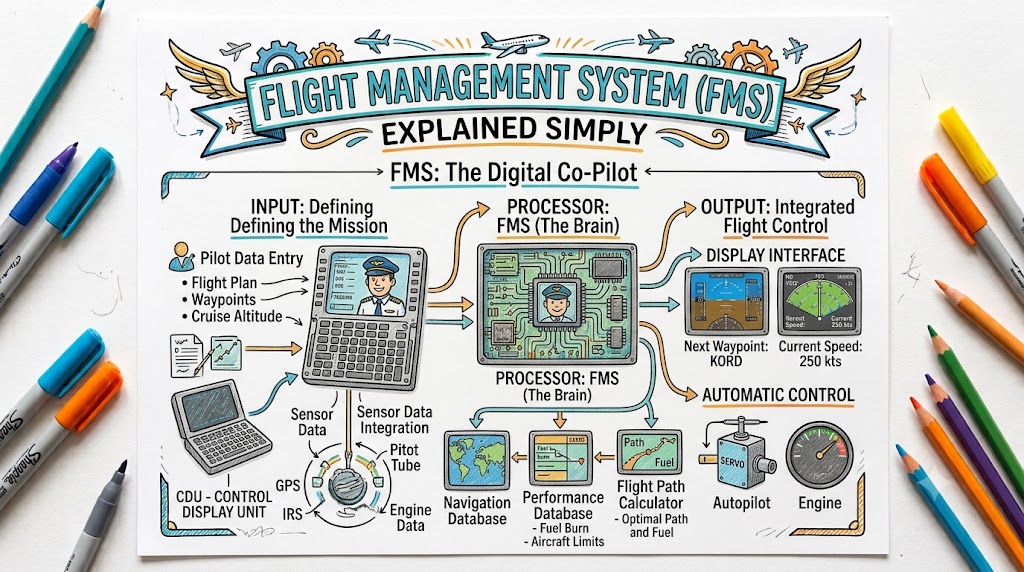
It helps the flight crew plan the route, calculate navigation information, monitor flight progress, manage aircraft performance, and provide guidance to cockpit displays and automatic flight-control systems.
At first, an FMS can look complicated. Its screens contain waypoint names, altitude restrictions, speed limits, route legs, performance data, and many abbreviations. However, the basic purpose of the system is straightforward: it helps the pilots manage the aircraft’s planned journey from departure to arrival.
This guide explains the Flight Management System in simple language, including its components, functions, operating process, common mistakes, and safety limitations.
What Is a Flight Management System?
A Flight Management System, commonly called an FMS, is an integrated combination of sensors, navigation receivers, computers, software, and an aviation database.
The system receives information from different aircraft equipment, determines the aircraft’s position, stores the planned route, calculates performance information, and sends navigation guidance to cockpit displays and automatic flight-control systems.
In simple terms, an FMS acts like a central flight-planning and navigation computer.
It can help answer questions such as:
- Where is the aircraft?
- Which waypoint comes next?
- How far is the destination?
- What route should the aircraft follow?
- What altitude restrictions apply?
- When should the descent begin?
- What speed should be maintained?
- How much fuel may remain at destination?
The exact capabilities depend on the aircraft, installed avionics, software version, navigation database, and operational approval.
FMS Full Form in Aviation
FMS stands for Flight Management System.
The name reflects its wider role. It does more than display the aircraft’s position. It helps manage navigation, route sequencing, aircraft performance, fuel predictions, vertical planning, and communication with other cockpit systems.
An FMS may be made up of several connected units rather than one physical box.
Main Components of a Flight Management System
Flight Management Computer
The Flight Management Computer, or FMC, is the main computing unit behind the system.
It processes information received from navigation sensors, aircraft systems, pilot entries, and the navigation database.
The computer may calculate:
- Aircraft position
- Desired flight path
- Distance to waypoints
- Estimated arrival times
- Ground speed
- Wind information
- Fuel predictions
- Climb and descent profiles
- Speed targets
- Route deviations
Some aircraft have two Flight Management Computers for redundancy.
Control Display Unit
The Control Display Unit, commonly called the CDU, is one of the main interfaces used by pilots to communicate with the FMS.
Depending on the aircraft, it may contain:
- A screen
- Alphabetic keys
- Numeric keys
- Function keys
- Line-select keys
- Page-selection keys
- Message areas
Pilots use the CDU to enter routes, select procedures, review waypoints, modify performance data, and monitor the flight plan.
Modern aircraft may use a touchscreen or multifunction display instead of a traditional keypad-style CDU.
Navigation Database
The navigation database contains coded aviation information used by the FMS.
It may include:
- Airports
- Runways
- Navigation aids
- Waypoints
- Airways
- Standard instrument departures
- Standard terminal arrivals
- Instrument approaches
- Holding patterns
- Route-leg information
- Speed and altitude restrictions
RNAV procedures contain defined waypoints and coded route-leg types that tell the navigation system how a path should be flown.
The database must be appropriate for the aircraft’s approved capabilities and intended operation. A procedure may not appear in the database when the aircraft is not eligible or technically capable of flying it.
Aircraft Performance Database
The performance database contains information related to the aircraft’s operating characteristics.
It may include:
- Engine performance
- Aircraft weight
- Climb capability
- Cruise performance
- Fuel consumption
- Speed schedules
- Descent performance
- Aircraft operating limits
The FMS combines this stored information with pilot-entered data and current flight conditions to produce performance predictions.
Navigation Sensors and Receivers
An FMS can receive position information from several sources.
These may include:
- Global Positioning System
- Inertial Reference Unit
- Inertial Navigation System
- Distance Measuring Equipment
- VHF Omnidirectional Range
- Localizer receiver
- Air-data system
- Radio altimeter
The FAA explains that FMS inputs may come from GPS, DME, VOR, localizer, and inertial reference systems. Depending on the system design, these inputs may be used individually or combined into one navigation solution.
Cockpit Displays
The FMS sends information to cockpit displays such as:
- Primary Flight Display
- Navigation Display
- Multifunction Display
- Horizontal Situation Indicator
- Engine and systems display
These displays allow pilots to see the route, active waypoint, desired track, distance, estimated arrival time, navigation performance, speed targets, and other flight information.
Automatic Flight-Control System
The automatic flight-control system includes systems such as the autopilot and flight director.
When correctly selected and engaged, the FMS may provide guidance commands that allow the aircraft to follow the programmed lateral and vertical route.
However, the FMS and autopilot are not the same system.
The FMS calculates and provides guidance. The autopilot may use that guidance to control the aircraft.
How Does a Flight Management System Work?
The FMS works by collecting, processing, comparing, calculating, and displaying information.
A simplified sequence looks like this:
- The pilots enter the flight route.
- The system retrieves waypoints and procedures from its database.
- Aircraft weight and performance information are entered.
- Navigation sensors provide position information.
- The FMS calculates the intended lateral and vertical flight path.
- The route appears on the navigation display.
- The system predicts times, speeds, fuel use, and descent points.
- The pilots review and activate the route.
- The FMS monitors the aircraft’s progress.
- The autopilot or flight director may follow the guidance when selected.
The pilots must continue monitoring the system throughout the flight.
Information Entered Before Flight
Before departure, the crew normally enters or verifies important flight information.
The exact sequence differs between aircraft, but common entries include:
Aircraft Position
The initial aircraft position may be entered or confirmed during system setup.
Correct position initialization is especially important for inertial navigation systems.
Origin and Destination
The departure and destination airports are entered using their recognised identifiers.
Planned Route
The route may include:
- Departure runway
- Departure procedure
- Airways
- En-route waypoints
- Arrival procedure
- Approach
- Destination runway
Aircraft Weight
The crew may enter:
- Zero-fuel weight
- Fuel quantity
- Gross weight
- Passenger or cargo information
- Centre-of-gravity data
Performance Information
Performance entries may include:
- Cruise altitude
- Cost index
- Reserve fuel
- Climb speed
- Cruise speed
- Descent speed
- Temperature information
- Thrust-reduction altitude
- Acceleration altitude
The exact entries depend on the aircraft and operator.
Understanding the FMS Flight Plan
The FMS flight plan is a connected sequence of route legs.
Each leg tells the system how the aircraft should move from one point to another.
A route may include:
- Direct-to-fix legs
- Track-to-fix legs
- Course-to-fix legs
- Heading legs
- Holding patterns
- Procedure turns
- Radius-to-fix turns
- Altitude-termination legs
RNAV procedures use coded leg types to define both the desired path and the condition that ends each leg.
Pilots do not normally need to memorise every database coding term, but they must understand how the selected procedure will guide the aircraft.
What Is a Waypoint?
A waypoint is a defined geographical position used to build a flight route.
A waypoint can represent:
- A named point in space
- An intersection
- A navigation facility
- A reporting point
- An airport reference point
- A position where the aircraft changes direction, speed, or altitude
The FAA describes waypoints as predetermined geographical positions, usually defined through latitude and longitude coordinates.
Fly-By Waypoint
At a fly-by waypoint, the FMS may begin turning before reaching the exact waypoint.
This turn anticipation helps the aircraft join the next route segment smoothly.
Fly-Over Waypoint
At a fly-over waypoint, the aircraft must cross the waypoint before beginning the next turn.
The difference is important because it affects the aircraft’s actual ground path.
What Are LNAV and VNAV?
LNAV
LNAV means Lateral Navigation.
LNAV guides the aircraft along the horizontal route programmed into the FMS.
It can command:
- Left turns
- Right turns
- Direct tracks
- Airway routes
- Departure paths
- Arrival paths
- Approach-course guidance
When connected to the flight director or autopilot, LNAV can help the aircraft follow the route automatically.
VNAV
VNAV means Vertical Navigation.
VNAV calculates and may guide the aircraft along a vertical profile.
It considers information such as:
- Selected cruise altitude
- Speed schedule
- Altitude restrictions
- Aircraft performance
- Wind information
- Aircraft weight
- Descent requirements
VNAV may help manage:
- Climb profiles
- Cruise altitude
- Step climbs
- Descent planning
- Speed restrictions
- Arrival restrictions
- Approach profiles
VNAV capability differs significantly between aircraft. Pilots must understand whether the system is providing advisory information, flight-director guidance, autopilot guidance, or approved approach guidance.
What Is the Top-of-Descent Point?
The top-of-descent point is the calculated location where the aircraft should begin descending to follow the planned vertical profile.
The FMS may calculate it using:
- Present altitude
- Target altitude
- Aircraft speed
- Wind
- Distance remaining
- Descent rate
- Route restrictions
- Aircraft performance
The point is normally displayed on the navigation display.
However, it is only a prediction. Air traffic control instructions, weather, speed changes, winds, or route changes can make the original descent calculation unsuitable.
Pilots must cross-check the descent plan rather than accepting it without review.
Flight Plan Discontinuity Explained
A flight plan discontinuity is a break between two route segments.
It indicates that the FMS does not have a continuous automatic path from one leg to the next.
A discontinuity may appear when:
- Radar vectors are expected
- Two procedures do not connect
- A runway has been changed
- A route modification is incomplete
- The arrival and approach have not been connected
- The system expects pilot action
A discontinuity should not be removed automatically without understanding why it exists.
Sometimes it must remain because air traffic control is expected to provide vectors. In other situations, the crew may need to connect the appropriate route legs.
Common FMS Pages
Page names differ between manufacturers, but many systems include pages for the following functions.
Identification Page
Displays information such as:
- Aircraft type
- Engine type
- Navigation database cycle
- Software information
Position Initialization Page
Used to verify or enter the aircraft’s starting position.
Route Page
Used to enter and review the origin, destination, runway, airways, and waypoints.
Departure and Arrival Page
Used to select:
- Departure procedures
- Arrival procedures
- Approaches
- Runways
- Procedure transitions
Legs Page
Displays the ordered sequence of route legs.
It may also show:
- Course
- Distance
- Speed restriction
- Altitude restriction
- Waypoint type
- Route discontinuity
Performance Page
Used to enter or review weight, fuel, speed, altitude, and aircraft-performance information.
Progress Page
Displays information such as:
- Current position
- Distance to destination
- Estimated arrival time
- Fuel predictions
- Navigation accuracy
- Next waypoint
Direct-To Page
Allows pilots to create immediate guidance from the present position or another route point to a selected waypoint.
FMS, FMC, CDU, and MCDU Differences
These terms are connected but do not always mean exactly the same thing.
| Term | Simple Meaning |
|---|---|
| FMS | The complete flight-management system |
| FMC | The computer that performs many FMS calculations |
| CDU | The unit used to control and display FMS information |
| MCDU | A multifunction CDU that may control the FMS and other systems |
| Navigation Display | The screen showing route and navigation information |
| Autopilot | The system that physically controls the aircraft when engaged |
Pilots sometimes use “FMS” and “FMC” casually as though they are interchangeable. Technically, the FMC is normally one component of the broader FMS.
Benefits of a Flight Management System
More Accurate Navigation
An FMS combines available sensor information to calculate a reliable navigation position.
Some systems can identify and isolate faulty navigation inputs.
Reduced Pilot Workload
The FMS automates many calculations that previously required manual work.
It can continuously update distance, estimated arrival time, track, fuel predictions, and route progress.
Efficient Routes
RNAV allows aircraft to follow desired flight paths without always flying directly from one ground-based navigation facility to another.
Potential benefits include reduced flying time, lower fuel use, fewer radio instructions, and more efficient use of airspace.
Better Flight Planning
The FMS helps pilots review the complete route, including departures, arrivals, altitude restrictions, and approaches.
Improved Performance Management
Advanced systems can calculate economical climb, cruise, and descent profiles.
Integration With Automation
FMS guidance can be supplied to cockpit displays, flight directors, and automatic flight-control systems.
Limitations of an FMS
An FMS is powerful, but it does not replace pilot judgment.
Important limitations include:
- Incorrect pilot entries
- Outdated database information
- Incorrect waypoint selection
- Sensor failure
- Programming mistakes
- Automation-mode confusion
- Incomplete route modifications
- Incorrect weight or fuel entries
- Navigation-performance limitations
- Procedures that the aircraft is not approved to fly
- Differences between charted and coded information
- Inaccurate predictions following weather or route changes
The system calculates results from the information it receives. Incorrect input can produce convincing but incorrect guidance.
Common FMS Mistakes
Entering the Wrong Waypoint
Similar waypoint names can appear in different locations.
Pilots should compare the waypoint’s position, course, and distance with the intended route.
Activating the Wrong Route Leg
Selecting the wrong leg can cause the FMS to guide the aircraft toward an unexpected waypoint.
Removing a Discontinuity Without Understanding It
A discontinuity may represent expected radar vectors or another operational requirement.
Failing to Confirm the Route
The route should be compared with the flight plan, clearance, and applicable charts.
Incorrect Performance Entries
Wrong weight, fuel, altitude, wind, or temperature information can affect system predictions.
Confusing FMS Guidance With Autopilot Control
Programming the route does not mean the aircraft will automatically follow it.
The correct flight-director or autopilot modes must also be selected.
Looking Inside the Cockpit Too Long
Complex programming during flight can reduce situational awareness.
When possible, difficult route changes should be completed during periods of lower workload or divided properly between crew members.
Following the Display Without Question
A route shown on the navigation display may still be unsuitable because of weather, terrain, airspace, traffic, aircraft performance, or an incorrect pilot entry.
FMS Safety Best Practices
Verify Before Activation
Before activating a route or modification, check:
- Waypoint sequence
- Route direction
- Track
- Distance
- Altitude restrictions
- Speed restrictions
- Departure runway
- Arrival runway
- Procedure transition
- Approach selection
- Missed-approach path
Compare the FMS With Charts
The programmed procedure should match the current chart and air traffic control clearance.
Confirm the Active Flight Mode
Pilots should know whether the aircraft is operating in:
- Heading mode
- LNAV mode
- Vertical speed mode
- Flight-level-change mode
- VNAV mode
- Approach mode
A correctly programmed FMS cannot protect against selecting the wrong autopilot mode.
Monitor Navigation Performance
RNAV and RNP operations require pilots to understand the capability and status of their navigation equipment.
RNP adds onboard performance monitoring and alerting to the RNAV concept. The aircraft must be able to tell the pilot whether the required navigation performance is being achieved.
Maintain Basic Flying Skills
Pilots must remain capable of controlling and navigating the aircraft when automation is unavailable or inappropriate.
Follow Aircraft-Specific Procedures
FMS designs differ between aircraft.
The aircraft flight manual, avionics documents, approved checklists, standard operating procedures, instructor guidance, and operator manuals must take priority over general explanations.
What Happens When the FMS Fails?
An FMS failure does not always mean that every navigation system has failed.
Depending on the aircraft, pilots may still have access to:
- A second FMS
- Independent GPS equipment
- Inertial navigation
- VOR and DME
- Localizer guidance
- Basic heading navigation
- Air traffic control vectors
- Standby flight instruments
A general response may include:
- Maintain control of the aircraft.
- Confirm the failure message.
- Check which functions remain available.
- Select an appropriate alternative navigation source.
- Follow the aircraft checklist.
- Inform air traffic control when necessary.
- Review fuel, weather, terrain, and diversion options.
- Avoid attempting complex troubleshooting during a high-workload phase.
The correct response always depends on the aircraft and operating procedure.
Frequently Asked Questions
Is an FMS the same as GPS?
No. GPS is one possible navigation input. The FMS is a wider system that may combine GPS with DME, VOR, localizer, inertial, air-data, and aircraft-performance information.
Is an FMS the same as an autopilot?
No. The FMS calculates navigation and performance guidance. The autopilot controls the aircraft when it is engaged in the appropriate mode.
What is the difference between an FMS and an FMC?
The FMS is the complete integrated system. The FMC is the computer that performs many of the calculations within that system.
What does a CDU do?
The CDU allows pilots to enter, review, modify, and monitor information within the FMS.
Can the FMS fly the aircraft automatically?
The FMS can provide guidance, but the flight director or autopilot must be correctly selected to follow that guidance. Pilots remain responsible for monitoring the aircraft.
What is LNAV in an FMS?
LNAV is lateral navigation. It guides the aircraft along the programmed horizontal route.
What is VNAV in an FMS?
VNAV is vertical navigation. It calculates or guides climbs, cruise levels, descents, speed targets, and altitude restrictions.
Why does the FMS show a discontinuity?
A discontinuity means that there is no continuous programmed path between two route legs. It may require pilot action, or it may exist because radar vectors are expected.
Can pilots manually create an instrument procedure in the FMS?
Pilots should use approved procedures retrieved from the appropriate current navigation database and follow aircraft-specific rules. Manually building a procedure may not preserve its required coding, path, restrictions, or operational approval.
Can the FMS make mistakes?
The computer follows its programming and input data. Incorrect entries, outdated information, sensor problems, or misunderstanding of automation can produce incorrect or unexpected guidance.
Key Takeaways
A Flight Management System combines navigation sensors, computers, databases, aircraft information, and cockpit displays into one integrated system.
It helps pilots:
- Plan and monitor routes
- Calculate aircraft position
- Manage lateral navigation
- Plan vertical profiles
- Predict time and fuel
- Load departures, arrivals, and approaches
- Supply guidance to flight displays and automation
However, safe FMS use depends on correct data entry, route verification, mode awareness, chart cross-checking, system monitoring, and strong basic flying skills.
Conclusion
A Flight Management System makes modern flight navigation and performance planning more accurate and efficient. Its basic purpose is to calculate where the aircraft is, where it should go, and how it can follow the planned route. Pilots must still verify every entry, understand the active modes, monitor the aircraft’s actual path, and remain prepared to take manual control when necessary.

