
Introduction
An aircraft autopilot can reduce pilot workload by controlling selected parts of the aircraft’s flight path. It may maintain a heading, hold an altitude, follow a navigation route, or support an instrument approach.
However, an autopilot is not an electronic replacement for the pilot. It follows the modes, targets, and instructions selected by the flight crew. Pilots must continue monitoring the aircraft’s attitude, airspeed, altitude, route, power, trim, and active automation modes.
The FAA describes an autopilot as a system that provides automatic aircraft control, typically through the pitch, roll, and sometimes yaw axes. The complete system can include sensors, computers, power supplies, controls, displays, servos, actuators, and associated wiring.
This Aircrafto guide explains autopilot fundamentals in simple language so aviation students can build a strong foundation before beginning aircraft-specific training.
What Is an Aircraft Autopilot?
An aircraft autopilot is an automatic flight-control system that moves selected flight controls to maintain a commanded flight condition.
Depending on the system, the autopilot may control:
- Aircraft attitude
- Bank angle
- Heading
- Altitude
- Vertical speed
- Airspeed-related pitch guidance
- Navigation course
- Instrument approach path
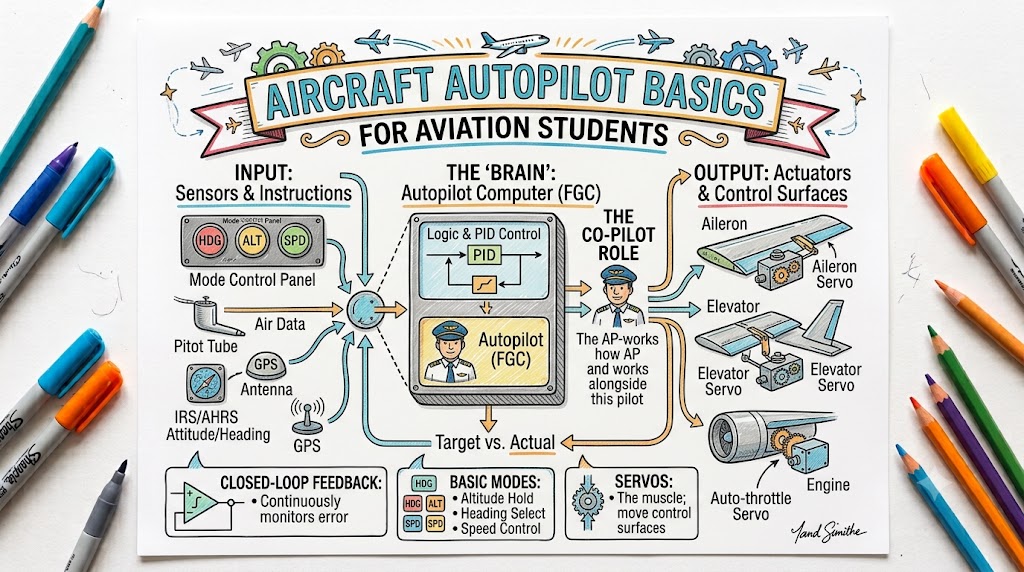
The pilot selects the desired mode and target. The autopilot receives information from aircraft sensors, calculates the required correction, and sends commands to electric or hydraulic servos connected to the flight controls.
For example, when altitude-hold mode is active, the autopilot detects movement away from the selected altitude and applies pitch corrections to return the aircraft toward it.
Why Aircraft Use Autopilot Systems
Autopilots are mainly used to reduce workload and improve flight-path stability.
During a long flight, manually maintaining an exact heading and altitude can consume significant attention. An autopilot can handle these routine control tasks while the pilot monitors weather, navigation, fuel, communication, traffic, and aircraft systems.
FAA training material notes that autopilot can reduce the physical and mental demands placed on the pilot, with heading hold and altitude hold among its common functions.
An autopilot can help with:
- Maintaining accurate headings
- Holding assigned altitudes
- Following GPS or FMS routes
- Reducing workload during instrument flight
- Stabilizing the aircraft during cruise
- Supporting instrument approaches
- Allowing more attention for planning and monitoring
- Improving consistency during high-workload operations
These benefits depend on correct programming, correct mode selection, proper system operation, and continuous pilot supervision.
How an Aircraft Autopilot Works
A basic autopilot operates through four main stages.
Sensors Measure the Aircraft’s Condition
Sensors provide information about the aircraft’s:
- Attitude
- Heading
- Altitude
- Airspeed
- Rate of climb or descent
- Turn rate
- Navigation position
- Course deviation
The equipment used depends on the aircraft and autopilot design.
The Pilot Selects a Mode
The pilot selects what the autopilot should control.
Examples include:
- Heading hold
- Altitude hold
- Vertical speed
- Navigation tracking
- Approach mode
The selected mode tells the autopilot which flight condition or path it should maintain.
The Computer Calculates Corrections
The autopilot computer compares the selected target with the aircraft’s actual condition.
For example, when the aircraft drifts to the right of a GPS course, the computer calculates a suitable left-bank command.
Servos Move the Flight Controls
Servos convert the computer’s commands into control movement.
They may move or influence:
- Ailerons
- Elevator
- Rudder
- Pitch-trim system
The system continuously measures the aircraft’s response and makes further corrections.
Understanding the Aircraft’s Three Control Axes
Roll Axis
Roll is movement around the aircraft’s longitudinal axis, which runs from the nose to the tail.
Roll control is normally provided through the ailerons. An autopilot uses the roll axis to:
- Maintain wings level
- Hold a bank angle
- Maintain a heading
- Follow a navigation course
- Intercept a localizer
Pitch Axis
Pitch is movement around the aircraft’s lateral axis, which runs from wingtip to wingtip.
Pitch control is normally provided through the elevator or stabilator. An autopilot uses the pitch axis to:
- Hold altitude
- Maintain a selected vertical speed
- Capture an altitude
- Follow vertical navigation guidance
- Track a glideslope
- Maintain a selected pitch attitude
Yaw Axis
Yaw is movement around the aircraft’s vertical axis.
Yaw control is provided through the rudder. Larger or more advanced systems may use yaw control to improve coordination, directional stability, passenger comfort, or engine-out handling.
One-Axis, Two-Axis, and Three-Axis Autopilots
One-Axis Autopilot
A one-axis system normally controls roll.
A simple wing-leveler is an example. It may keep the wings approximately level but may not control altitude.
Two-Axis Autopilot
A two-axis autopilot controls roll and pitch.
It may maintain:
- Heading or navigation course
- Altitude
- Vertical speed
- Pitch attitude
This type is common in many general aviation aircraft.
Three-Axis Autopilot
A three-axis autopilot controls roll, pitch, and yaw.
Three-axis systems are generally found in larger, faster, or more complex aircraft. Autopilot designs vary considerably, so pilots must study the approved documents for the specific installation.
Main Components of an Autopilot System
Autopilot Computer
The computer processes sensor information and pilot selections. It calculates the control corrections needed to achieve the selected target.
Mode Controller
The mode controller is the cockpit panel through which the pilot selects autopilot functions.
It may contain controls for:
- Autopilot engagement
- Flight director
- Heading
- Altitude
- Vertical speed
- Navigation mode
- Approach mode
- Airspeed-related modes
- Yaw damper
Sensors
Sensors tell the autopilot what the aircraft is doing.
Modern integrated systems may obtain information from:
- Attitude and heading reference systems
- Air-data computers
- GPS receivers
- Flight management systems
- VOR and localizer receivers
- Inertial reference systems
Servos
Servos move the flight controls in response to autopilot commands.
Some systems have separate servos for:
- Pitch
- Roll
- Yaw
- Pitch trim
Mode Annunciations
Mode annunciations show which functions are:
- Active
- Armed
- Captured
- Disconnected
- Failed
Pilots must check these indications after every automation selection. FAA guidance emphasizes that mode, state, status, and malfunction information should be clearly presented because pilots must know what the system is actually doing.
Autopilot Disconnect Control
Most systems provide a quick-disconnect button on the control wheel or control stick.
Disconnection normally creates a visual and aural warning so the pilot knows that manual control is required.
Common Aircraft Autopilot Modes
Mode names and behaviour vary between manufacturers. The following explanations describe common functions rather than operating instructions for a particular aircraft.
Wing-Level Mode
Wing-level mode attempts to maintain approximately level wings.
It may not maintain the aircraft’s present heading. Wind, imbalance, turbulence, and system design can still allow heading changes.
Roll Mode
Roll mode may maintain a selected bank angle or the bank condition that existed when the mode was activated.
Heading Mode
Heading mode turns the aircraft toward and maintains the heading selected on the heading bug.
Aviation students must remember that heading mode follows the selected heading—not necessarily the programmed GPS route.
Navigation Mode
Navigation mode follows guidance from a selected navigation source, such as:
- GPS
- Flight Management System
- VOR
- Localizer
Before selecting the mode, the pilot must verify that the correct navigation source and course are active.
Approach Mode
Approach mode provides more sensitive tracking for an instrument approach.
Depending on the equipment and procedure, it may track:
- Localizer
- Glideslope
- GPS lateral guidance
- Approved vertical approach guidance
Selecting approach mode does not guarantee that the system has captured the required guidance. The pilot must verify the annunciations.
Pitch Mode
Pitch mode maintains a selected pitch attitude.
Because airspeed changes with power, configuration, wind, and flight conditions, the pilot must continue monitoring speed.
Altitude-Hold Mode
Altitude hold maintains approximately the altitude at which the mode is activated or the altitude captured by the system.
The pilot must still monitor:
- Airspeed
- Power
- Trim
- Weather
- Terrain
- Altitude indication
Vertical-Speed Mode
Vertical-speed mode commands a selected rate of climb or descent.
One major danger is allowing airspeed to become too low during a climb or too high during a descent. The autopilot may continue trying to achieve the selected vertical speed even when the available power or aircraft performance is insufficient.
Altitude-Select and Capture Mode
The pilot enters a target altitude, and the autopilot may level the aircraft when that altitude is approached.
Selecting an altitude does not always make the aircraft climb or descend. A suitable vertical mode may also need to be selected.
Flight-Level-Change Mode
Flight-level-change mode usually controls pitch to maintain a selected airspeed during a climb or descent.
Power may need to be set manually unless the aircraft also has an automatic thrust system.
Vertical Navigation Mode
VNAV follows a calculated vertical profile produced by an FMS or advanced navigation system.
It may manage:
- Climb targets
- Cruise altitude
- Descent path
- Speed restrictions
- Altitude restrictions
VNAV functions vary greatly, and pilots must understand the aircraft-specific logic.
Autopilot and Flight Director Differences
An autopilot and a flight director are related but different.
Flight Director
The flight director displays command bars or guidance cues on the primary flight display.
These cues tell the pilot how to pitch or bank the aircraft to follow the selected flight path. The pilot manually moves the controls to follow them.
Autopilot
The autopilot moves the flight controls automatically through its servos.
In an integrated system, the flight director and autopilot normally use the same selected modes. FAA guidance states that when an active flight director is available, the autopilot should engage consistently with that flight director’s mode and flight-path guidance.
A useful distinction is:
- Flight director: Shows what control movement is required.
- Autopilot: Performs the control movement automatically.
Autopilot and Autothrottle Differences
The autopilot controls the aircraft’s flight path through pitch, roll, and sometimes yaw.
The autothrottle or autothrust system controls engine thrust.
An aircraft can have:
- Autopilot without autothrottle
- Autothrottle without all autopilot modes
- Both systems integrated
- Neither system installed
Even when both systems are operating, pilots must monitor airspeed, thrust, flight path, and mode status.
Active and Armed Modes
Understanding active and armed modes is essential.
Active Mode
An active mode is currently controlling or guiding the aircraft.
For example, heading mode may be active and controlling the aircraft’s roll.
Armed Mode
An armed mode is waiting for specific conditions before becoming active.
For example, altitude capture may be armed while vertical-speed mode remains active. As the aircraft approaches the selected altitude, altitude capture becomes active.
Students should develop the habit of asking:
- What mode did I select?
- What mode is armed?
- What mode is active?
- What will the system do next?
A Simple Autopilot Engagement Process
The exact checklist must come from the aircraft’s approved operating documents, but a general learning sequence is:
- Hand-fly the aircraft into a stable condition.
- Set the required heading, altitude, course, or vertical target.
- Confirm the navigation source.
- Select the required flight-director modes.
- Check the mode annunciations.
- Engage the autopilot when permitted.
- Confirm that the aircraft responds correctly.
- Monitor attitude, airspeed, altitude, power, trim, and route.
- Keep a hand near the controls when conditions require quick intervention.
- Disconnect immediately when the response becomes unsafe or unexpected.
The pilot must follow the minimum engagement altitude, configuration restrictions, mandatory disconnection requirements, and other limitations published for the specific aircraft.
Why the Aircraft Should Be Stable Before Engagement
Engaging the autopilot while the aircraft is badly out of trim or rapidly changing attitude can produce an uncomfortable or unexpected response.
Before engagement, pilots should normally ensure that:
- The aircraft is under control.
- Attitude is reasonable.
- Airspeed is stable.
- Power is suitable.
- Trim is approximately correct.
- The desired modes and targets are selected.
- Flight controls are not being opposed.
The autopilot is designed to maintain or capture selected conditions—not rescue the pilot from every unstable situation.
Understanding Autopilot and Trim
Trim reduces continuous control pressure.
In many autopilot installations, pitch trim works automatically with the pitch servo. The system adjusts trim so that the pitch servo does not have to maintain excessive force.
A dangerous condition can develop when the autopilot is applying increasing control force while the aircraft becomes significantly out of trim. When the autopilot disconnects, the pilot may experience a sudden control force or aircraft movement.
FAA guidance identifies out-of-trim conditions, excessive trim rates, low airspeed, unusual attitudes, and limits of autopilot authority as situations requiring attention, alerts, or possible disconnection.
Pilots must therefore monitor:
- Trim movement
- Unexpected control pressure
- Unusual servo activity
- Autopilot alerts
- Aircraft attitude
- Airspeed trends
Mode Awareness and Automation Surprise
Automation surprise occurs when the system does something that the pilot did not expect.
It often results from misunderstanding:
- Which mode is active
- Which mode is armed
- Which target has been selected
- Which navigation source is connected
- Whether a mode captured successfully
- Whether the system changed modes automatically
For example, a pilot may expect the aircraft to follow GPS guidance while heading mode remains active. The autopilot then maintains the selected heading instead of turning toward the route.
Preventing automation surprise requires regular mode checks and continuous comparison between the expected and actual aircraft response.
Autopilot Limitations
An autopilot cannot make every flight decision.
It does not automatically guarantee protection from:
- Bad weather
- Terrain
- Traffic
- Incorrect route programming
- Fuel problems
- Airspace violations
- Excessive or insufficient airspeed
- Icing
- Turbulence
- Sensor errors
- Incorrect pilot selections
Autopilot limitations may include:
- Minimum engagement altitude
- Maximum operating speed
- Minimum operating speed
- Flap or landing-gear restrictions
- Turbulence limitations
- Icing restrictions
- Approach limitations
- Required system availability
- Mandatory disengagement height
These limits are aircraft-specific and must be checked in the approved flight manual, pilot operating handbook, supplements, checklists, or operator procedures. FAA guidance specifically identifies engagement altitude, mandatory disengagement requirements, and configuration or flight-envelope restrictions as information that may need to be published.
When Pilots Should Disconnect the Autopilot
A pilot should be prepared to disconnect when:
- The aircraft moves unexpectedly.
- The selected mode behaves incorrectly.
- The aircraft approaches an unsafe attitude.
- Airspeed becomes unsafe.
- Trim runs continuously or abnormally.
- The autopilot repeatedly fails to capture a target.
- Conflicting indications appear.
- The system disconnects automatically.
- Manual flight provides better control.
- The aircraft checklist requires disconnection.
- Turbulence, icing, or another condition exceeds approved limitations.
When the automation does not behave as expected, the safest response is often to reduce complexity: disconnect, stabilize the aircraft manually, assess the situation, and re-engage only when the problem is understood.
What to Do After an Unexpected Autopilot Disconnect
The aircraft-specific checklist always takes priority. A general response is:
- Take positive manual control.
- Maintain the correct attitude.
- Check airspeed.
- Apply suitable power.
- Correct any unexpected bank or pitch.
- Retrim the aircraft.
- Confirm altitude and heading.
- Cancel the disconnect warning as appropriate.
- Identify the reason for disconnection.
- Follow the approved checklist.
- Inform air traffic control when necessary.
- Do not re-engage until it is safe and permitted.
The FAA expects pilots to remain aware of autopilot performance and take timely corrective action when the flight path is not being managed safely.
Common Autopilot Mistakes Made by Students
Engaging Before Trimming
A badly trimmed aircraft can create excessive servo workload and an unexpected control force after disconnection.
Selecting the Wrong Heading
The autopilot accurately follows the selected target, even when that target was entered incorrectly.
Forgetting the Navigation Source
The pilot may expect GPS tracking while the system is connected to a VOR, localizer, or another source.
Confusing Armed and Active Modes
A mode shown as armed is not yet controlling the aircraft.
Selecting Altitude Without a Vertical Mode
Entering a target altitude may not cause the aircraft to climb or descend.
Ignoring Airspeed in Vertical-Speed Mode
A high climb rate can reduce airspeed toward a stall. A high descent rate can increase airspeed beyond limitations.
Fighting the Autopilot
Applying control pressure against an engaged autopilot can create confusion or an out-of-trim condition.
Disconnect it using the approved method before taking manual control.
Looking Inside for Too Long
Programming and mode changes can distract pilots from aircraft control, traffic, terrain, and weather.
Trusting Automation Without Monitoring
Autopilot operation does not remove pilot responsibility. The pilot must supervise the system and remain prepared to take control.
Practical Student Training Exercises
Autopilot training should be completed with a qualified instructor and in accordance with the aircraft’s approved procedures.
Useful training exercises may include:
- Identifying every autopilot control
- Locating all disconnect methods
- Engaging wings-level mode
- Selecting heading mode
- Capturing and holding altitude
- Using vertical-speed mode
- Monitoring airspeed during climbs
- Tracking GPS guidance
- Intercepting a navigation course
- Recognizing active and armed modes
- Practising normal disconnection
- Responding to simulated unexpected disconnection
- Hand-flying immediately after automation removal
Ground simulators can also help students practise mode selection without creating unnecessary cockpit workload.
Beginner Autopilot Checklist
Before Flight
- Review aircraft-specific autopilot limitations.
- Learn all engagement and disconnection methods.
- Check required circuit breakers and switches.
- Test the system according to the approved checklist.
- Understand the mode annunciations.
- Review the minimum engagement altitude.
- Confirm which controls the autopilot can move.
Before Engagement
- Stabilize the aircraft.
- Set suitable power.
- Trim correctly.
- Confirm the navigation source.
- Set the required heading or course.
- Set the selected altitude.
- Choose the correct lateral and vertical modes.
- Verify active and armed annunciations.
After Engagement
- Confirm the aircraft’s movement is correct.
- Check attitude and airspeed.
- Monitor altitude and heading.
- Confirm the expected modes remain active.
- Watch trim and servo behaviour.
- Remain ready to disconnect.
Before Disconnection
- Place a hand on the controls.
- Expect a possible change in control pressure.
- Disconnect using the approved method.
- Silence or acknowledge the warning.
- Maintain attitude and retrim.
Best Practices for Safe Autopilot Use
- Learn the specific system rather than assuming all autopilots work alike.
- Set targets carefully before selecting modes.
- Verbalize mode changes during training.
- Check the flight-mode annunciator after every selection.
- Monitor what the aircraft is doing, not only what was commanded.
- Keep the aircraft properly trimmed.
- Watch airspeed closely in pitch-related modes.
- Practise all approved disconnection methods.
- Maintain manual flying proficiency.
- Use the autopilot to reduce workload, not to avoid understanding the aircraft.
- Disconnect early when automation becomes confusing.
- Follow the approved aircraft manual and instructor guidance.
Frequently Asked Questions
What is the main purpose of an aircraft autopilot?
Its main purpose is to control selected parts of the aircraft’s flight path, reducing workload while maintaining conditions such as heading, altitude, or navigation course.
Can an autopilot take off an aircraft?
Most conventional general aviation autopilots are not approved to control the takeoff. Some advanced aircraft have specialised automatic takeoff-related capabilities, but these are aircraft-specific and not a standard autopilot function.
Can an autopilot land an aircraft?
Some suitably equipped and approved aircraft can perform automatic approaches and landings. A basic general aviation autopilot should not be assumed capable of automatically landing the aircraft.
Does autopilot control engine power?
Not normally. Engine power is controlled by the pilot or by a separate autothrottle or autothrust system.
What is the difference between heading and navigation modes?
Heading mode follows the heading selected by the pilot. Navigation mode follows guidance from a navigation source such as GPS, FMS, VOR, or localizer.
Does altitude hold protect against a stall?
No. An autopilot attempting to maintain altitude can increase pitch as airspeed decreases. Pilots must continuously monitor power and airspeed.
Why must the aircraft be trimmed before autopilot engagement?
Correct trim reduces servo workload and helps prevent sudden control forces when the autopilot disconnects.
What does an autopilot servo do?
A servo converts autopilot computer commands into movement of a flight control or trim system.
Should a pilot fight an autopilot that is moving incorrectly?
The approved response is generally to disconnect the autopilot and take manual control rather than continuously opposing it. The aircraft-specific procedure must be followed.
Can pilots stop practising manual flight after learning autopilot operation?
No. Autopilots can fail, disconnect, reach their control limits, or behave unexpectedly. Manual aircraft-control skills remain essential.
Key Takeaways
An aircraft autopilot is a flight-control system that uses sensors, computers, mode selections, and servos to control the aircraft in pitch, roll, and sometimes yaw.
Safe autopilot operation depends on five essential habits:
- Select the correct target.
- Select the correct mode.
- Confirm the mode annunciation.
- Monitor the aircraft’s actual response.
- Disconnect and hand-fly when the response is unsafe or unclear.
Conclusion
Aircraft autopilot systems can improve accuracy and reduce pilot workload, but they require continuous supervision. Aviation students must understand the difference between active and armed modes, monitor airspeed and trim, verify every selection, know all disconnect methods, and remain proficient in manual flying. The safest pilot is not the one who uses the most automation, but the one who understands exactly what the automation is doing.

