
Introduction
A CI/CD pipeline can release software quickly, but speed alone does not make the delivery process successful.
A poorly designed pipeline may produce unreliable builds, expose credentials, hide test failures, deploy the wrong artifact, or leave teams without a safe recovery path. These problems can make automation more dangerous than the manual process it replaced.
Reliable CI/CD Pipelines create repeatable, visible, secure, and testable paths from source code to production.
Continuous integration provides rapid feedback by building and testing small code changes regularly. Continuous delivery keeps validated software in a deployable condition so that teams can release it safely when required. DORA defines continuous delivery as the ability to release changes quickly, safely, and sustainably on demand.
A dependable pipeline should answer several questions:
- Which source-code version was built?
- Which tests and security checks passed?
- Which artifact was produced?
- Who approved the production release?
- Which configuration was used?
- How was deployment health verified?
- Can the previous version be restored quickly?
- How does the release affect users?
This article explains how to design, secure, test, monitor, and improve CI/CD pipelines. It also covers practical tools, deployment strategies, projects, interview questions, DORA metrics, BestDevOps learning resources, and DevOpsIQ engineering measurement.
What Is a CI/CD Pipeline?
A CI/CD pipeline is an automated workflow that moves software through a series of validation and delivery stages.
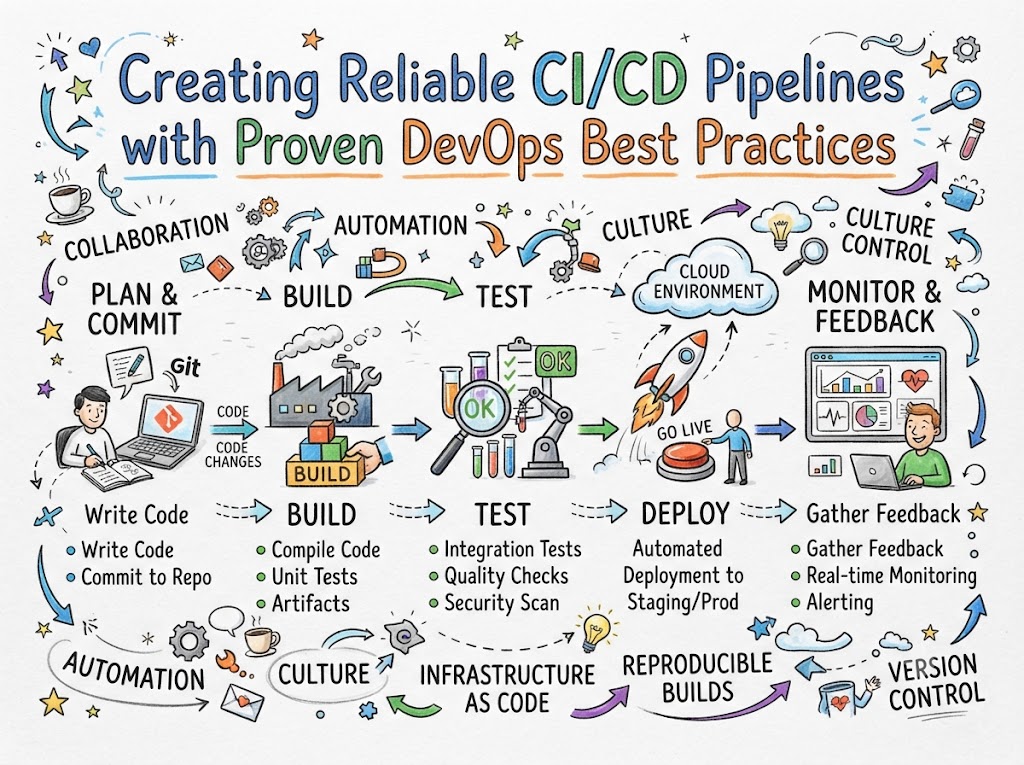
A typical pipeline follows this path:
Commit → Build → Test → Scan → Package → Publish → Deploy → Verify → Monitor
The exact stages depend on the application, risk level, technology, and organization.
GitLab pipelines, for example, are composed of stages and jobs. Stages can run in sequence, while independent jobs within the same stage can run in parallel. Jenkins Pipeline allows teams to model processes ranging from simple continuous integration to complete delivery workflows, while GitHub Actions supports automated build, test, and deployment workflows inside a repository.
Continuous Integration
Continuous integration focuses on validating frequent code changes.
It normally includes:
- Code compilation
- Unit tests
- Static analysis
- Dependency checks
- Configuration validation
- Artifact creation
- Fast feedback
The purpose is to detect integration problems while changes are still small and easier to correct.
Continuous Delivery
Continuous delivery extends the process by preparing tested software for deployment.
It may include:
- Artifact publication
- Environment deployment
- Acceptance tests
- Security validation
- Approval rules
- Release verification
- Rollback preparation
The software remains ready for release, although production deployment may still require approval.
Continuous Deployment
Continuous deployment automatically releases every change that successfully passes the required controls.
This approach requires strong automated testing, monitoring, rollback, security, and operational confidence.
Continuous deployment should not be adopted merely to increase deployment numbers. It should be introduced only when the delivery system can detect and manage failures safely.
Why CI/CD Pipeline Reliability Matters
A pipeline is part of the production delivery system.
When it becomes unreliable, the entire engineering organization is affected.
Common consequences include:
- Developers stop trusting pipeline results.
- Failed jobs are repeatedly restarted without investigation.
- Teams bypass automated controls.
- Production releases become stressful.
- Security checks are ignored.
- Artifacts cannot be traced to source code.
- Recovery takes longer.
- Manual deployment work returns.
- Customers experience avoidable failures.
Pipeline reliability means more than technical availability.
A reliable pipeline should be:
- Repeatable
- Traceable
- Secure
- Fast enough for useful feedback
- Easy to understand
- Resistant to temporary failures
- Consistent across environments
- Capable of safe recovery
Core Characteristics of a Reliable CI/CD Pipeline
Deterministic Builds
The same source code, dependencies, and build configuration should produce an equivalent artifact.
Uncontrolled dependency versions, manually modified build servers, and environment-specific scripts can make builds inconsistent.
Fast Feedback
Developers should receive the most useful information as early as possible.
Quick checks should run before slower tests so that obvious problems do not consume unnecessary pipeline resources.
Clear Failure Information
A failed pipeline should explain:
- Which stage failed
- Which command or test failed
- What evidence is available
- Whether the failure is related to code or infrastructure
- What action may be required
Immutable Artifacts
The application should normally be built once and promoted across environments.
Rebuilding the same release separately for testing, staging, and production can introduce differences.
Secure Access
Every job should receive only the permissions and credentials required for its task.
GitHub’s security guidance recommends applying least privilege to workflow permissions and carefully controlling untrusted code, third-party actions, and access to deployment resources.
Safe Deployment
The pipeline should support health checks, gradual rollout, verification, and rollback.
Measurable Performance
Teams should monitor pipeline duration, queue time, failure causes, deployment outcomes, and recovery trends.
Recommended CI/CD Pipeline Architecture
A well-designed pipeline can be divided into logical layers.
Source Validation Layer
This layer checks the proposed change before expensive work begins.
It may include:
- Commit-format validation
- Branch-policy checks
- Configuration linting
- Formatting
- Secret detection
- Lightweight static analysis
These checks should return feedback quickly.
Build Layer
The build layer converts source code into a usable package.
It may:
- Install dependencies
- Compile code
- Generate assets
- Create binaries
- Build container images
- Record version information
The build should use controlled versions of languages, tools, and dependencies.
Automated Testing Layer
Testing should be divided according to speed, scope, and purpose.
Possible test levels include:
- Unit tests
- Component tests
- API tests
- Integration tests
- Contract tests
- Security tests
- Performance tests
- Acceptance tests
Not every test needs to run at the same stage.
Fast tests can run for every proposed change, while expensive tests can run after integration or in dedicated environments.
Security Layer
Security controls may include:
- Static application security testing
- Dependency scanning
- Licence checks
- Secret detection
- Container-image scanning
- Infrastructure scanning
- Policy validation
- Artifact signing
- Provenance generation
OWASP identifies CI/CD systems as important attack targets and highlights risks involving pipeline manipulation, credentials, access controls, third-party services, and insufficient flow controls.
Artifact Layer
Successful builds should publish versioned artifacts to a controlled repository.
Examples include:
- Container images
- Application packages
- Java archives
- Compiled binaries
- Infrastructure bundles
- Deployment charts
The artifact should include enough metadata to connect it with:
- Source-code commit
- Pipeline run
- Build environment
- Dependency versions
- Test results
- Security results
SLSA provenance describes how an artifact was produced, including information about its source, builder, build process, and inputs. This information can improve traceability and software supply-chain integrity.
Deployment Layer
This layer moves the tested artifact into an environment.
Deployment tasks may include:
- Loading environment configuration
- Obtaining temporary credentials
- Applying infrastructure changes
- Running database migrations
- Deploying the application
- Updating traffic routing
- Recording release information
Verification Layer
Deployment completion does not prove application health.
Verification may include:
- Health checks
- Smoke tests
- API checks
- Transaction tests
- Error-rate checks
- Latency checks
- Dependency checks
- Service-level objective validation
Recovery Layer
A reliable pipeline should define what happens when verification fails.
Recovery options include:
- Automatic rollback
- Manual rollback
- Feature-flag deactivation
- Traffic restoration
- Previous configuration restoration
- Forward correction
Essential CI/CD Tools Comparison
| Category | Common Tools | Primary Purpose | Suitable Teams |
|---|---|---|---|
| Source management | GitHub, GitLab, Bitbucket | Store and review code | All engineering teams |
| Pipeline automation | Jenkins, GitHub Actions, GitLab CI/CD | Build, test, and deploy software | Development and DevOps teams |
| Build tools | Maven, Gradle, npm, Make | Compile and package applications | Application teams |
| Container tools | Docker, Podman, Buildah | Build application images | Cloud and platform teams |
| Artifact repositories | Nexus, Artifactory, GitHub Packages | Store versioned artifacts | Delivery teams |
| Code analysis | SonarQube, Semgrep | Detect quality and security problems | Developers and security teams |
| Image scanning | Trivy and similar scanners | Detect container vulnerabilities | DevSecOps teams |
| Infrastructure as Code | Terraform, OpenTofu, Pulumi | Automate infrastructure changes | Cloud and platform teams |
| Deployment tools | Argo CD, Flux, Helm | Manage application releases | Kubernetes teams |
| Observability | Prometheus, Grafana, OpenTelemetry | Monitor pipeline and application health | DevOps and SRE teams |
| Engineering intelligence | DevOpsIQ | Connect delivery and reliability data | Teams and engineering leaders |
Jenkins, GitHub Actions, and GitLab CI/CD
Jenkins
Jenkins is an extensible automation server capable of supporting simple CI jobs and complete delivery pipelines.
Jenkins Pipeline allows the workflow to be defined in a Jenkinsfile and stored in source control alongside the application. This makes the pipeline reviewable and versioned.
Jenkins may be suitable when teams require:
- Extensive customization
- Self-hosted control
- Broad plugin support
- Integration with established internal systems
- Complex pipeline logic
Teams must also manage:
- Server upgrades
- Plugin compatibility
- Security patches
- Credentials
- Backup
- Worker capacity
GitHub Actions
GitHub Actions supports CI/CD workflows directly within GitHub repositories.
It is often convenient for teams already using GitHub for source control, code review, issues, and packages. GitHub environments can add deployment approvals, environment-specific secrets, branch restrictions, and protection rules.
GitLab CI/CD
GitLab CI/CD uses a configuration file to define jobs, stages, commands, dependencies, and deployment behaviour.
Jobs within a stage can run concurrently, while dependency-based execution can allow jobs to begin as soon as their required inputs are ready.
The right platform depends on integrations, governance, hosting requirements, team knowledge, security, cost, and operational responsibility.
Step-by-Step Process for Building a Reliable Pipeline
Step 1: Map the Existing Delivery Process
Before creating automation, document how software currently reaches production.
Record:
- Source-code workflow
- Build process
- Testing process
- Security reviews
- Artifact handling
- Environment preparation
- Deployment activities
- Approval requirements
- Verification
- Recovery
Identify manual work, waiting periods, repeated failures, and unclear ownership.
Step 2: Define Pipeline Success Criteria
Decide what a successful pipeline should achieve.
Possible goals include:
- Provide feedback within an agreed period
- Produce one traceable artifact
- Prevent untested code from being deployed
- Protect production credentials
- Support repeatable deployment
- Verify application health
- Restore the previous version quickly
These criteria help teams avoid automating unnecessary complexity.
Step 3: Store the Pipeline as Code
Pipeline definitions should be stored in version control.
This allows teams to:
- Review workflow changes
- Track history
- Test changes
- Restore previous versions
- Reuse templates
- Apply code-review rules
Pipeline configuration deserves the same care as application code because it can control builds, credentials, infrastructure, and deployments.
Step 4: Begin with a Minimal Pipeline
The first pipeline may contain only:
- Source checkout
- Dependency installation
- Application build
- Unit tests
- Artifact creation
Once this works reliably, add security, deployment, monitoring, and advanced tests gradually.
A simple pipeline that teams understand is more valuable than a complex pipeline that nobody can maintain.
Step 5: Build Once
Create one versioned artifact from one source-code revision.
Promote that artifact to testing, staging, and production rather than rebuilding it differently in each environment.
External configuration can change by environment, but the application package should remain consistent whenever possible.
Step 6: Arrange Tests for Fast Feedback
Run the fastest and most important checks first.
A practical order may be:
- Formatting and linting
- Unit tests
- Static analysis
- Dependency scanning
- Build
- Component tests
- Integration tests
- Security tests
- Performance tests
- Deployment verification
This reduces wasted time when an early check can identify the problem.
Step 7: Run Independent Jobs in Parallel
Tests that do not depend on each other can run simultaneously.
GitLab supports parallel jobs within stages and dependency-based execution that can reduce unnecessary waiting.
Parallel execution can shorten feedback time, but teams should also consider runner capacity and cost.
Step 8: Control Dependencies
Uncontrolled dependency updates can make builds unpredictable.
Use:
- Lock files
- Version constraints
- Approved package registries
- Dependency scanning
- Update automation
- Reproducible build environments
Dependency updates should pass the same testing and review process as application changes.
Step 9: Protect Secrets
Do not store passwords, tokens, private keys, or cloud credentials directly in pipeline files or repositories.
Use:
- Secret-management systems
- Environment-specific credentials
- Short-lived tokens
- Secret rotation
- Masked logs
- Least-privilege access
OpenID Connect can allow GitHub Actions workflows to access cloud resources without storing long-lived cloud credentials in repository secrets.
Step 10: Separate Environments
Development, testing, staging, and production should have clear boundaries.
Separate:
- Credentials
- Configuration
- Permissions
- Data
- Deployment rules
- Approval policies
Production access should be more restricted than development access.
Step 11: Automate Deployment
DORA recommends removing manual deployment steps where practical and keeping deployment automation as simple as possible.
A deployment job should:
- Identify the artifact
- Load approved configuration
- Authenticate securely
- Apply the release
- Record the deployment
- Verify health
- Report the result
- Initiate recovery when required
Step 12: Add Post-Deployment Verification
Do not mark the pipeline successful immediately after deployment commands finish.
Check:
- Application readiness
- Important APIs
- Database connectivity
- Error rate
- Latency
- User transactions
- Dependency health
- Service objectives
Step 13: Test the Rollback Process
A rollback process that has never been tested should not be considered reliable.
Kubernetes Deployments, for example, support rollout history and restoration to previous revisions. Rolling updates gradually replace existing Pods, while rollout controls can support monitoring, pausing, resuming, and rollback.
Step 14: Monitor Pipeline Health
Monitor the pipeline as an engineering service.
Useful indicators include:
- Pipeline success rate
- Median duration
- Queue time
- Runner utilization
- Failed-stage distribution
- Flaky-test rate
- Deployment success
- Rollback frequency
- Infrastructure failures
- Time to repair broken pipelines
Proven CI/CD Best Practices
Keep Changes Small
Small changes are easier to review, test, understand, deploy, and reverse.
Continuous integration works best when developers integrate frequently and use fast automated tests to protect the shared codebase. DORA connects continuous integration with small batches, rapid feedback, and frequent integration.
Use Trunk-Based Development Carefully
Long-lived branches increase the risk of difficult merges and delayed integration.
A trunk-based workflow normally uses short-lived branches or direct integration supported by:
- Automated tests
- Pull-request reviews
- Feature flags
- Branch protection
- Frequent synchronization
Keep the Main Branch Deployable
A broken main branch blocks every team member who depends on it.
Protect the main branch with required reviews and automated checks.
When it breaks, restoring it should receive high priority.
Use Reusable Pipeline Components
Shared templates reduce duplication and make approved practices easier to adopt.
Reusable components may include:
- Build jobs
- Security scans
- Container publishing
- Deployment steps
- Notifications
- Environment verification
Templates should remain configurable enough for legitimate application differences.
Use Isolated Build Environments
Build jobs should run in clean, controlled environments.
This reduces problems caused by:
- Files left by previous builds
- Manually installed packages
- Shared dependencies
- Conflicting tool versions
- Uncontrolled configuration
Containers and temporary runners can provide repeatable build environments.
Use Caching Carefully
Caching can reduce pipeline duration, but incorrect caches can create confusing failures.
Cache:
- Downloaded dependencies
- Build intermediates
- Tool data
Do not treat a cache as the authoritative source of a release artifact.
Use clear cache keys and invalidation rules.
Eliminate Flaky Tests
A flaky test sometimes passes and sometimes fails without a meaningful code change.
Repeated flaky failures reduce trust in the pipeline.
Teams should:
- Track flaky tests
- Assign owners
- Correct or quarantine them
- Avoid endless automatic retries
- Investigate timing and dependency problems
Make Manual Approvals Risk-Based
Not every release requires the same control.
Low-risk changes with strong automated evidence may progress automatically. Higher-risk changes may require additional review.
Approvals should add informed risk control rather than become routine button-clicking.
Separate Build and Deployment Permissions
A build job usually does not need production access.
Divide permissions so that:
- Build jobs can read source code and publish artifacts.
- Testing jobs can use test environments.
- Deployment jobs can access only their required environments.
- Production jobs receive restricted credentials after approval.
Pin Third-Party Components
Uncontrolled third-party pipeline actions, plugins, and images can change unexpectedly.
Review external components and pin them to trusted versions or immutable references where practical. GitHub’s enterprise guidance specifically recommends governing third-party actions and pinning approved actions to full commit identifiers.
Preserve Useful Evidence
Store:
- Test reports
- Security results
- Build logs
- Artifact metadata
- Deployment records
- Approval records
- Verification results
Retention should balance troubleshooting, audit needs, storage cost, security, and privacy.
CI/CD Security Best Practices
A pipeline often has access to source code, packages, credentials, cloud resources, and production systems. It must be treated as a sensitive part of the software supply chain.
Apply Least Privilege
Every user, runner, job, and token should receive only the permissions required.
Use Short-Lived Credentials
Temporary credentials reduce the impact of accidental exposure.
Protect Pipeline Configuration
Pipeline files should require code review because changing them may allow commands to run with elevated permissions.
OWASP describes poisoned pipeline execution as a risk in which an attacker manipulates pipeline configuration to execute malicious commands in the build environment.
Isolate Untrusted Code
Code from external contributors should not automatically receive access to sensitive credentials or production resources.
Control Third-Party Integrations
Each external service connected to the repository or pipeline expands the attack surface.
OWASP identifies ungoverned third-party services as a CI/CD risk because integrations may receive access to repositories, builds, artifacts, or other engineering resources.
Secure Runners
Maintain runner operating systems, container images, installed tools, networking, and access controls.
Sensitive workloads should not share unsafe execution environments with untrusted jobs.
Improve Credential Hygiene
Rotate secrets, remove unused credentials, restrict their scope, and prevent their exposure in logs.
OWASP identifies weak credential hygiene and excessive pipeline permissions as important CI/CD security risks.
Generate Artifact Provenance
Build provenance can help consumers verify the source and build process behind an artifact.
It does not replace vulnerability scanning, secure coding, or dependency management, but it strengthens traceability.
Deployment Strategies
Rolling Deployment
A rolling deployment replaces old application instances gradually.
It can maintain service availability when the application supports mixed-version operation and readiness checks.
Blue-Green Deployment
Blue-green deployment maintains two environments:
- Blue represents the current version.
- Green represents the new version.
After verification, traffic moves to the new environment.
Rollback can be fast because the previous environment remains available.
The approach may require additional infrastructure and careful database compatibility.
Canary Deployment
A canary release sends a small percentage of users or traffic to the new version.
Teams observe:
- Error rate
- Latency
- Resource usage
- Customer transactions
- Business indicators
Traffic increases only when the version remains healthy.
Feature Flags
Feature flags separate code deployment from feature release.
Teams can deploy code while controlling whether a feature is active.
Flags require ownership and cleanup. Old flags can create confusing application behaviour.
Progressive Delivery
Progressive delivery combines gradual exposure with automated health evaluation.
The pipeline can pause or reverse a rollout when agreed thresholds are exceeded.
Deployment Strategy Comparison
| Strategy | Main Benefit | Main Risk | Suitable Scenario |
|---|---|---|---|
| Rolling | Gradual replacement with efficient resource use | Old and new versions may run together | Stateless applications |
| Blue-green | Fast traffic switch and rollback | Additional environment cost | Important customer services |
| Canary | Limits initial user exposure | Requires strong monitoring | High-traffic applications |
| Feature flags | Separates deployment from release | Flag complexity and cleanup | Incremental product releases |
| Recreate | Simple deployment model | Temporary downtime | Internal or low-risk systems |
Pipeline Testing Strategy
A reliable pipeline tests both the application and the delivery process.
Unit Testing
Tests small pieces of application logic.
Unit tests should be fast and run frequently.
Component Testing
Tests a service or component with controlled dependencies.
Integration Testing
Checks whether services, databases, queues, and external interfaces work together.
Contract Testing
Checks whether independently developed services continue to follow agreed API contracts.
End-to-End Testing
Tests complete customer workflows.
These tests provide broad coverage but may be slower and more difficult to maintain.
Security Testing
Checks code, dependencies, infrastructure, packages, and application behaviour for security risks.
Performance Testing
Measures application behaviour under expected or increased workload.
Deployment Testing
Validates:
- Configuration
- Credentials
- Health checks
- Network access
- Database migration
- Rollback
- Environment readiness
Common CI/CD Challenges and Solutions
| Challenge | Likely Cause | Practical Solution |
|---|---|---|
| Slow pipeline | Sequential jobs and repeated setup | Parallelize independent jobs and use controlled caching |
| Frequent false failures | Flaky tests or unstable infrastructure | Track failure causes and correct unreliable tests |
| Different environment behaviour | Separate builds and uncontrolled configuration | Build once and externalize configuration |
| Unsafe credentials | Long-lived or over-permissioned secrets | Use short-lived credentials and least privilege |
| Difficult troubleshooting | Poor logs and unclear job names | Produce structured output and preserve evidence |
| Manual deployment steps | Legacy processes or missing automation | Automate one repeatable step at a time |
| Risky database changes | Application and schema changes are tightly coupled | Use backward-compatible migrations |
| Pipeline duplication | Every team creates independent workflows | Provide reusable templates |
| Expensive runners | Inefficient stages and uncontrolled parallelism | Measure workload and optimize runner use |
| Low developer trust | Unreliable results and slow feedback | Prioritize pipeline reliability as product work |
| Failed rollback | Recovery is undocumented or untested | Test rollback regularly |
| Security bottleneck | Security checks happen late | Move common checks earlier into CI |
Practical CI/CD Example
Consider an engineering team maintaining an online ordering application.
A developer opens a pull request containing a small checkout change.
The pipeline performs the following actions:
- Validates formatting and configuration.
- Runs unit tests.
- Scans dependencies and secrets.
- Builds the application.
- Creates a versioned container image.
- Scans the image.
- Publishes it to an artifact registry.
- Deploys it to a temporary test environment.
- Runs API and checkout tests.
- Deploys the same image to staging.
- Runs performance and acceptance checks.
- Requests production approval.
- Releases the image to a small percentage of traffic.
- Monitors error rate, latency, and successful orders.
The new version causes an increase in payment failures.
The pipeline stops the rollout and returns traffic to the previous version. Deployment records show the exact source commit and image version involved.
The investigation finds that the application used an incompatible payment API setting.
The team then adds a contract test to detect the problem before future releases.
This is a reliable delivery process because it combines automation, traceability, monitoring, controlled exposure, recovery, and learning.
Real-World CI/CD Use Cases
Startup Teams
Startups can begin with repository-based workflows, managed runners, container images, and a simple cloud deployment.
Their priority should be fast feedback without unnecessary platform complexity.
Growing Software Companies
As repositories and teams increase, organizations may introduce:
- Shared templates
- Central artifact repositories
- Security standards
- Environment controls
- Deployment dashboards
- Platform support
Large Enterprises
Enterprises often need:
- Audit records
- Segregated permissions
- Controlled runners
- Policy enforcement
- Internal package registries
- Multi-environment governance
- Standard pipeline components
Regulated Organizations
Regulated environments may require evidence showing:
- Who approved a change
- Which tests ran
- Which artifact was deployed
- Which security controls passed
- When the release occurred
- How access was controlled
Automation can produce this evidence consistently.
Microservices Teams
Microservice environments need independent pipelines while maintaining shared standards for security, observability, deployment, and service ownership.
Platform Engineering Teams
Platform teams can provide reusable workflows, build environments, deployment templates, secrets integration, and observability defaults.
CI/CD Learning Roadmap
Stage 1: Source Control
Learn Git, branches, commits, pull requests, reviews, tags, and release history.
Stage 2: Build Automation
Automate dependency installation, compilation, packaging, and build reporting.
Stage 3: Automated Testing
Add unit, integration, and quality checks.
Stage 4: Pipeline as Code
Store the pipeline definition in the repository and review changes.
Stage 5: Artifact Management
Create versioned artifacts and publish them to a controlled repository.
Stage 6: Containers
Learn Dockerfiles, registries, image tags, scanning, and runtime configuration.
Stage 7: Infrastructure as Code
Use Terraform or another tool to create repeatable environments.
Stage 8: Automated Deployment
Deploy to development, testing, staging, and production environments.
Stage 9: Security
Add secret protection, scanning, access controls, and supply-chain safeguards.
Stage 10: Observability and Recovery
Monitor releases and practise rollback and incident response.
Stage 11: Pipeline Optimization
Improve duration, reliability, reuse, capacity, and cost.
Stage 12: Engineering Intelligence
Connect pipeline activity with deployments, incidents, recovery, SLOs, and DORA metrics.
Essential DevOps Engineer Skills
Technical Skills
- Git and source control
- Linux
- Networking
- Scripting
- CI/CD platforms
- Build tools
- Automated testing
- Containers
- Artifact repositories
- Cloud platforms
- Infrastructure as Code
- Kubernetes
- Monitoring
- Security
- Troubleshooting
Pipeline Design Skills
- Stage organization
- Dependency management
- Parallel execution
- Artifact promotion
- Environment separation
- Secret handling
- Deployment verification
- Rollback design
- Failure reporting
- Template development
Professional Skills
- Clear documentation
- Code review
- Cross-team communication
- Risk assessment
- Incident coordination
- Root-cause analysis
- Continuous improvement
Practical CI/CD Projects
Project 1: Pull-Request Validation Pipeline
Objective: Validate every proposed application change.
Include:
- Formatting
- Unit tests
- Build
- Dependency scanning
- Test reports
Skills developed: CI, Git workflows, testing, failure analysis.
Project 2: Container Build and Publish Pipeline
Objective: Build and publish a secure, versioned container image.
Include:
- Multi-stage build
- Image scan
- Version tags
- Registry publication
- Build metadata
Skills developed: Containers, artifact management, security.
Project 3: Multi-Environment Delivery Pipeline
Objective: Promote one artifact through testing, staging, and production.
Include:
- Environment-specific configuration
- Approval rules
- Smoke tests
- Release records
- Rollback
Skills developed: Continuous delivery, environment control, recovery.
Project 4: Infrastructure and Application Pipeline
Objective: Automate both cloud infrastructure and application release.
Include:
- Terraform planning
- Infrastructure approval
- Application deployment
- Verification
- Change records
Skills developed: Infrastructure as Code, cloud automation, pipeline separation.
Project 5: Progressive Deployment Pipeline
Objective: Release a version gradually and stop when health declines.
Include:
- Canary traffic
- Error-rate checks
- Latency checks
- Automated pause
- Rollback
Skills developed: Progressive delivery, observability, reliability.
Project 6: Secure Supply-Chain Pipeline
Objective: Improve artifact integrity and traceability.
Include:
- Dependency scanning
- Secret detection
- Image scanning
- Artifact signing
- Provenance
- Restricted credentials
Skills developed: DevSecOps, software supply-chain security.
Project 7: Pipeline Performance Dashboard
Objective: Measure pipeline reliability and speed.
Include:
- Duration
- Queue time
- Failure rate
- Flaky tests
- Deployment outcomes
- Recovery time
Skills developed: Engineering measurement and optimization.
Best DevOps Course and Certification Strategy
A strong CI/CD course should include:
- Git-based workflows
- Pipeline as Code
- Build automation
- Automated testing
- Artifact management
- Docker
- Security scanning
- Cloud deployment
- Infrastructure as Code
- Kubernetes releases
- Monitoring
- Rollback exercises
- Pipeline troubleshooting
- Practical projects
Certification can support structured learning in areas such as:
- Cloud platforms
- Kubernetes
- Terraform
- Linux
- Security
- Site Reliability Engineering
However, certification should be supported by practical evidence.
A learner should be able to explain:
- Why pipeline stages were selected
- How artifacts are versioned
- How secrets are protected
- How deployment health is measured
- How rollback works
- How pipeline failures are investigated
CI/CD Career Opportunities
DevOps Engineer
Designs and maintains build, test, deployment, infrastructure, and monitoring automation.
Build and Release Engineer
Focuses on build systems, versioning, artifact management, and release processes.
Platform Engineer
Creates reusable pipeline and deployment capabilities for application teams.
Site Reliability Engineer
Improves release safety, observability, reliability, and recovery.
DevSecOps Engineer
Protects pipelines, artifacts, dependencies, credentials, and deployment environments.
Cloud Engineer
Builds and manages cloud environments used by delivery workflows.
Engineering Productivity Engineer
Improves build speed, test feedback, development workflows, and pipeline experience.
DevOps Engineer Salary Factors
CI/CD knowledge can influence a DevOps Engineer Salary, but compensation depends on several combined factors:
- Country and city
- Professional experience
- Cloud knowledge
- Pipeline design ability
- Kubernetes experience
- Security responsibilities
- Infrastructure skills
- Troubleshooting ability
- Industry
- Organization size
- Leadership duties
- Communication skills
Candidates should compare salary information for similar responsibilities and locations rather than relying on one global average.
DORA Metrics for CI/CD Pipelines
DORA’s current software-delivery performance model uses five metrics divided into throughput and instability: change lead time, deployment frequency, failed deployment recovery time, change fail rate, and deployment rework rate.
Change Lead Time
Measures how long a code change takes to reach production.
Pipeline improvements may reduce lead time by removing:
- Slow feedback
- Manual handovers
- Repeated approvals
- Unavailable environments
- Sequential work
- Unstable tests
Deployment Frequency
Measures how often software is deployed.
Frequent deployment is valuable when releases remain useful, stable, and recoverable.
Failed Deployment Recovery Time
Measures how long teams take to recover from a failed deployment.
Reliable rollback, observability, ownership, and runbooks can reduce this time.
Change Fail Rate
Measures the proportion of deployments requiring intervention because they degraded service.
Better testing, smaller changes, progressive delivery, and health verification may reduce failure rates.
Deployment Rework Rate
Measures the proportion of deployments that are unplanned corrections for user-facing production problems.
Repeated corrective deployments may indicate weak testing, unclear requirements, configuration problems, or unstable release practices.
CI/CD Measurement Table
| Metric | What It Reveals | Possible Improvement |
|---|---|---|
| Pipeline duration | Feedback speed | Parallelize jobs and optimize setup |
| Queue time | Runner capacity constraints | Improve scheduling or capacity |
| Pipeline failure rate | Workflow reliability | Study failure categories |
| Flaky-test rate | Test trustworthiness | Correct or quarantine unstable tests |
| Change lead time | Delivery-flow speed | Remove waiting and manual handovers |
| Deployment frequency | Release capability | Improve automation and batch size |
| Change fail rate | Release stability | Strengthen testing and verification |
| Recovery time | Ability to restore service | Improve rollback and incident response |
| Rework rate | Emergency corrective work | Prevent repeated production failures |
Metrics should help teams improve the delivery system. They should not be used to rank individual developers.
How BestDevOps Supports CI/CD Learning
BestDevOps can support learners and professionals through:
- CI/CD tutorials
- DevOps Roadmaps
- Tool comparisons
- Jenkins resources
- GitHub Actions learning
- GitLab CI/CD concepts
- Docker tutorials
- Kubernetes learning
- Infrastructure as Code
- DevSecOps guidance
- Practical projects
- Interview preparation
- Certification information
- Career resources
These resources can help readers understand both pipeline tools and the broader engineering practices needed for reliable software delivery.
How DevOpsIQ Supports Pipeline Improvement
DevOpsIQ can extend CI/CD implementation into connected engineering measurement.
Based on the platform description, it can combine metadata from tools such as:
- GitHub
- GitLab
- Jenkins
- Jira
- Prometheus
- Datadog
This connected view can help teams:
- Track deployment frequency
- Measure change lead time
- Identify failed releases
- Connect deployments with incidents
- Review rollback and recovery events
- Monitor SLO compliance
- Track error-budget consumption
- Compare service trends
- Find pipeline bottlenecks
- Prioritize reliability work
The Pulse Score provides a summarized service-health view.
It should be reviewed together with deployment events, incident history, SLOs, recovery performance, dependencies, and service context.
DevOps Interview Questions and Answers
1. What is a CI/CD pipeline?
A CI/CD pipeline is an automated workflow that builds, tests, secures, packages, deploys, and verifies software changes.
2. What is the difference between continuous integration and continuous delivery?
Continuous integration validates frequent code changes. Continuous delivery keeps successfully validated software ready for controlled release.
3. What is continuous deployment?
Continuous deployment automatically releases every change that passes the required pipeline controls.
4. Why should pipelines be stored as code?
Pipeline as Code provides version history, review, testing, reuse, and recovery.
5. Why should an application be built only once?
Building once ensures the same tested artifact moves through each environment and reduces inconsistencies.
6. What is an immutable artifact?
It is a versioned artifact that is not modified after creation.
7. Why should fast tests run first?
They provide early feedback and prevent expensive jobs from running when a basic problem already exists.
8. What is a flaky test?
A flaky test produces inconsistent results without a meaningful application change.
9. How can pipeline duration be reduced?
Parallelize independent jobs, use controlled caching, remove duplicate work, and improve test organization.
10. How should pipeline secrets be protected?
Use secure secret stores, short-lived credentials, least privilege, masking, and controlled environment access.
11. What is artifact provenance?
Artifact provenance records information about how and where a software artifact was built and which inputs were used.
12. What is a quality gate?
A quality gate is a defined condition that must pass before the pipeline can continue.
13. What is a canary deployment?
It releases a new version to a limited amount of traffic before wider rollout.
14. What is blue-green deployment?
It uses two environments so traffic can move from the current version to a verified new version.
15. Why are post-deployment checks important?
A successful deployment command does not guarantee that the application works correctly for users.
16. What should happen when deployment verification fails?
The pipeline should stop further rollout and begin an approved recovery process.
17. How do you investigate a failed pipeline?
Review the failed stage, logs, recent changes, dependencies, environment status, credentials, and runner health.
18. What is change lead time?
It measures the time required for a code change to move from version control into production.
19. Should every deployment require manual approval?
No. Approval requirements should reflect risk, automation quality, compliance needs, and environment sensitivity.
20. How should CI/CD success be measured?
Use pipeline reliability, feedback time, deployment performance, recovery, failure trends, security, and user impact.
Future CI/CD Trends
Reusable Platform Workflows
Platform teams are creating supported pipeline templates and self-service delivery capabilities.
Ephemeral Environments
Temporary environments can be created for pull requests and removed after testing.
Software Supply-Chain Evidence
Artifact signing, provenance, dependency visibility, and build integrity are becoming more important.
Policy as Code
Security and governance rules can be versioned, tested, and enforced automatically.
AI-Assisted Pipeline Analysis
AI tools may help summarize failures, locate patterns, and recommend investigation paths. Engineers must still verify their conclusions.
Progressive Delivery
More teams are connecting deployment automation with real-time service-health evaluation.
Unified Engineering Intelligence
Pipeline, deployment, incident, reliability, and developer-experience data are increasingly being analysed together.
Frequently Asked Questions
1. Which CI/CD tool is best for beginners?
Repository-based tools such as GitHub Actions or GitLab CI/CD can provide an accessible starting point. Jenkins is also valuable for learning highly customizable pipeline automation.
2. How many stages should a pipeline contain?
There is no fixed number. Use enough stages to make validation and delivery clear without creating unnecessary complexity.
3. Should production deployments be fully automated?
They can be when testing, security, observability, recovery, and organizational confidence are strong enough. Some environments may still require approvals.
4. How long should a CI pipeline take?
It should provide useful feedback quickly enough to support normal development. The appropriate duration depends on the application and required tests.
5. Can CI/CD work without containers?
Yes. Pipelines can build and deploy virtual-machine applications, serverless functions, mobile applications, packages, and other software formats.
6. Should database migrations run automatically?
They can, but migrations should be reviewed, tested, backward-compatible where practical, observable, and recoverable.
7. How can teams prevent duplicate pipelines?
Use event filters, concurrency controls, reusable workflows, and clear rules about which branch events should trigger work.
8. What is the safest way to use cloud credentials?
Prefer short-lived, narrowly scoped credentials and identity federation rather than permanent access keys.
9. How often should rollback be tested?
It should be tested regularly and whenever major changes affect deployment, data, infrastructure, or recovery behaviour.
10. Are manual pipeline steps always bad?
No. A manual step can provide meaningful risk control. It becomes wasteful when it adds delay without informed review.
11. How can teams improve pipeline trust?
Correct flaky tests, provide clear failures, maintain runners, keep feedback fast, and treat pipeline problems as engineering work.
12. What proves that a CI/CD pipeline is reliable?
It produces repeatable artifacts, useful feedback, secure deployments, clear evidence, measurable health checks, and tested recovery.
Key Takeaways
- A reliable pipeline is repeatable, traceable, secure, observable, and recoverable.
- CI/CD should provide fast feedback without sacrificing meaningful validation.
- Pipeline definitions should be stored and reviewed as code.
- Build the application once and promote the same artifact.
- Run fast tests early and independent jobs in parallel.
- Protect credentials through least privilege and short-lived access.
- Treat pipeline configuration as part of the software supply chain.
- Verify application health after deployment.
- Select deployment strategies according to risk and application architecture.
- Test rollback before it is required during an incident.
- Use DORA metrics and pipeline indicators to guide improvement.
- BestDevOps supports CI/CD learning, while DevOpsIQ connects delivery and reliability data.
Conclusion
Creating Reliable CI/CD Pipelines requires more than connecting a repository to a deployment tool. The pipeline must become a trusted engineering system that can build, test, secure, release, verify, and recover software consistently.
A strong implementation begins with small changes, version control, Pipeline as Code, fast automated tests, and one traceable artifact. Security controls should protect credentials, build environments, third-party components, and production access throughout the workflow.
Deployment automation should also be designed around operational reality. A completed command does not prove that users can successfully use the application. Health checks, smoke tests, telemetry, gradual rollout, and service-level indicators help teams understand the real effect of every release.
Recovery is equally important. Teams should practise rollback, feature deactivation, configuration restoration, and incident response before a serious production failure occurs.
Pipeline performance must then be measured. Duration, queue time, flaky tests, change lead time, deployment frequency, failure rate, recovery time, and rework can reveal where the delivery process needs improvement.
BestDevOps can help individuals learn CI/CD concepts, tools, projects, security practices, certifications, and interview skills. DevOpsIQ can help organizations connect pipelines with deployments, incidents, SLOs, recovery events, and service health.
The final goal is not simply faster deployment. It is a dependable software delivery process that gives engineering teams the confidence to release useful changes safely and improve continuously.

