
Introduction
Modern aircraft constantly monitor engines, flight controls, fuel, electricity, hydraulics, navigation, pressurization, landing gear, fire protection, and many other systems.
When something changes or becomes abnormal, the cockpit alerting system brings the condition to the pilots’ attention. The alert may appear as a colored light, written message, symbol, voice announcement, warning horn, control vibration, or a combination of several indications.
Not every cockpit message represents an emergency. Some require immediate action, while others provide information that should be reviewed when workload allows.
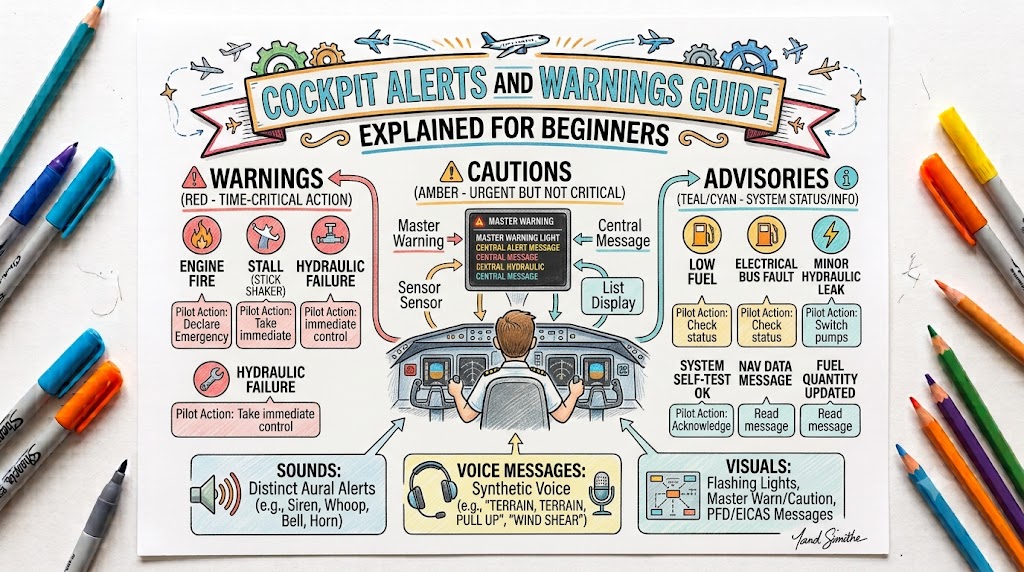
Aircraft alerting regulations organize alerts according to the urgency of pilot awareness and response. The three main categories are warning, caution, and advisory.
This Aircrafto guide explains how cockpit alerts work, what their colors and sounds commonly mean, how major alerting systems differ, and how pilots should respond safely.
What Are Cockpit Alerts?
Cockpit alerts are visual, aural, or tactile indications that inform pilots about an aircraft condition.
They help the flight crew:
- Identify an abnormal system condition
- Understand the urgency of the situation
- Locate the affected system
- Determine whether action is required
- Monitor whether the condition improves or becomes worse
Aircraft alerts are designed to be detectable and understandable during normal and abnormal operations, including situations in which several alerts appear together.
Cockpit alerts may be presented through:
- Individual warning lights
- Annunciator panels
- Master warning lights
- Master caution lights
- EICAS messages
- ECAM messages
- Primary flight-display alerts
- Engine-display messages
- Warning horns
- Voice announcements
- Stick shakers
- Control vibrations
- Autopilot disconnect tones
Difference Between an Alert, Indication, and Message
These terms are related but not always identical.
Alert
An alert attracts the pilot’s attention to a condition that requires awareness and may require action.
Indication
An indication displays information about an aircraft system or flight condition.
Examples include:
- Oil pressure
- Fuel quantity
- Hydraulic pressure
- Cabin altitude
- Landing-gear position
- Electrical voltage
An indication may be normal or abnormal.
Message
A message is written information presented on a display.
Messages may be classified as:
- Warning
- Caution
- Advisory
- Status
- Maintenance
- Memo
EICAS, ECAM, and similar electronic systems can present several priority levels of system information, including warnings, cautions, advisories, status information, and maintenance messages.
Main Cockpit Alert Priorities
Warning
A warning identifies a condition requiring immediate pilot awareness and immediate pilot response.
Warnings represent the highest alert priority.
Possible examples include:
- Engine fire
- Cabin-altitude emergency
- Stall warning
- Severe windshear warning
- Terrain pull-up warning
- Dangerous configuration
- Serious flight-control failure
A warning does not always mean the aircraft is already uncontrollable. It means that delaying the response could significantly increase danger.
Caution
A caution identifies a condition requiring immediate pilot awareness followed by an appropriate response.
Possible examples include:
- Generator failure
- Low hydraulic pressure
- Low fuel quantity
- Anti-ice malfunction
- Abnormal system temperature
- Equipment degradation
- Fuel imbalance
A caution may allow the pilots enough time to stabilize the aircraft, identify the condition, and then complete the appropriate checklist.
Advisory
An advisory identifies a condition requiring pilot awareness and possibly a later response.
Examples may include:
- A system operating in an alternate mode
- A non-critical equipment fault
- A status change
- A maintenance condition
- Reduced system availability
The regulatory hierarchy defines warnings as requiring immediate awareness and response, cautions as requiring immediate awareness and subsequent response, and advisories as requiring awareness with possible subsequent action.
Cockpit Alert Priority Table
| Alert Category | General Meaning | Typical Response |
|---|---|---|
| Warning | Immediate danger or serious abnormal condition | Respond immediately |
| Caution | Important abnormal condition | Stabilize, identify, and respond |
| Advisory | Condition requiring awareness | Review and act when needed |
| Status | Current system condition | Monitor or consider operational effects |
| Memo | Reminder of a selected configuration | Confirm that the condition is intended |
| Maintenance | Information mainly intended for servicing | Record and report as required |
The exact classifications and required responses vary between aircraft.
Understanding Cockpit Alert Colors
Red
Red is normally reserved for warning alerts.
A red alert may be accompanied by:
- Master warning illumination
- Repeating warning tone
- Voice announcement
- Fire bell
- Flashing message
- Tactile warning
Transport-aircraft regulations specify red for warning indications.
Amber or Yellow
Amber or yellow normally represents a caution.
It means the condition requires immediate awareness and a later corrective response.
Transport-aircraft regulations specify amber or yellow for caution indications.
Advisory Colors
Advisory messages may use colors other than red or green under current transport-aircraft alerting requirements. The exact color depends on aircraft and manufacturer design.
Green
Green commonly indicates a normal, safe, or completed condition.
Examples may include:
- Landing gear down and locked
- A system operating normally
- A valve reaching its commanded position
- Equipment correctly engaged
However, color meanings should always be confirmed using the aircraft manual.
Blue
Blue often indicates that a system has been selected or is operating.
Examples may include:
- Anti-ice selected
- Lighting selected
- A system mode active
- Equipment status
White
White commonly presents general information, memo messages, or system status.
A white message may confirm a pilot selection without necessarily confirming that the system has completed the requested action.
Magenta and Cyan
Modern flight displays may use magenta or cyan for:
- Selected flight targets
- Navigation routes
- Armed modes
- Flight-director commands
- FMS information
These colors normally represent guidance or mode information rather than failures.
Why Pilots Must Not Depend on Color Alone
The alert label is more important than the color by itself.
Pilots should evaluate:
- Exact message wording
- Alert location
- Whether it is flashing
- Aural alert
- Related instrument readings
- Aircraft handling
- Additional messages
- System synoptic displays
- Checklist instructions
A red engine-fire alert and a red cabin-altitude alert are both urgent, but their procedures are completely different.
Visual, Aural, and Tactile Alerts
Visual Alerts
Visual alerts include:
- Lights
- Symbols
- Written messages
- Colored display areas
- Flight-display flags
- Flashing indications
- Master warning and caution lights
They help the pilot identify the affected system and condition.
Aural Alerts
Aural alerts include:
- Bells
- Horns
- Chimes
- Repeating tones
- Voice warnings
- Autopilot disconnect sounds
Aural alerts are useful because they can attract attention even when the pilot is looking outside or at another part of the cockpit.
Tactile Alerts
Tactile alerts communicate through physical sensation.
Examples include:
- Stick shaker
- Control-column vibration
- Rudder-pedal vibration
- Stick pusher
- Control-force changes
Warning and caution alerts on transport-category aircraft must provide attention-getting cues through at least two senses using visual, aural, or tactile methods.
What Is the Master Warning Light?
The master warning light is a high-priority attention-getting indication.
It tells the pilot that a serious warning has appeared elsewhere in the cockpit.
The master warning light usually does not identify the exact fault. The pilot must check:
- Annunciator panel
- EICAS or ECAM display
- Engine display
- Primary flight display
- Overhead panel
- Warning message
Pressing or acknowledging the master warning may silence or reset part of the attention-getting system. It does not remove the underlying condition.
What Is the Master Caution Light?
The master caution light attracts attention to a caution message or system abnormality.
The pilot should:
- Maintain aircraft control.
- Identify the associated message.
- Check related instruments.
- Follow the appropriate checklist.
- Monitor the affected system.
Acknowledging the master caution does not mean that the fault has been corrected.
What Is an Annunciator Panel?
An annunciator panel is a group of labelled lights that monitors aircraft systems.
It may contain alerts involving:
- Oil pressure
- Fuel pressure
- Electrical generation
- Battery discharge
- Vacuum pressure
- Hydraulic pressure
- Doors
- Landing gear
- Pitot heat
- Anti-ice
- Fire detection
- Pressurization
Traditional aircraft often use physical annunciator lights. Glass-cockpit aircraft may display the same information through digital messages.
What Is EICAS?
EICAS stands for Engine Indicating and Crew Alerting System.
It combines engine information with aircraft-system alerts on electronic displays.
An EICAS may present:
- Engine parameters
- Warning messages
- Caution messages
- Advisory messages
- Status messages
- Maintenance information
FAA technical material defines EICAS as an electronic instrumentation system that monitors airframe and engine parameters and displays essential information to the crew.
EICAS is commonly associated with Boeing aircraft, although similar terminology and functions may appear in other designs.
What Is ECAM?
ECAM stands for Electronic Centralized Aircraft Monitoring.
It displays aircraft-system information and may guide pilots through certain abnormal procedures.
An ECAM may show:
- Warning and caution messages
- Affected system pages
- System diagrams
- Checklist actions
- Status information
- Operational limitations
ECAM is commonly associated with Airbus aircraft.
EICAS and ECAM perform similar broad alerting and monitoring functions, but their display logic, message hierarchy, controls, and operating procedures are not identical. Pilot training must therefore be specific to the aircraft type.
Common Cockpit Alerts and Warnings
Stall Warning
A stall warning indicates that the aircraft is approaching a critical angle of attack.
The warning may include:
- Horn
- Voice alert
- Stick shaker
- Light
- Flight-display indication
- Stick pusher on some aircraft
The correct response is based on the approved stall-recovery procedure. Pilots must respond to the aerodynamic condition rather than concentrating only on stopping the warning.
Overspeed Warning
An overspeed warning indicates that the aircraft has exceeded or is approaching a speed limit.
Possible causes include:
- Excessive descent rate
- Incorrect power setting
- Strong tailwind
- Autopilot or mode-management error
- Turbulence
- Incorrect configuration
The pilot should reduce speed using approved procedures while avoiding abrupt control movement.
Engine Fire Warning
An engine-fire warning may include:
- Red fire light
- Fire bell
- Master warning
- Voice alert
- Illuminated fire handle
- EICAS or ECAM message
This alert normally requires immediate aircraft-specific memory actions followed by the checklist.
Smoke Warning
Smoke alerts may identify smoke in the:
- Cockpit
- Cabin
- Cargo compartment
- Avionics compartment
- Lavatory
- Electrical equipment area
Smoke must be treated seriously because an electrical or hidden fire may develop before visible flames appear.
Low Oil Pressure Alert
A low oil-pressure alert indicates that engine lubrication pressure may be below the approved range.
Pilots should verify the alert using:
- Oil-pressure indication
- Oil temperature
- Engine power
- Engine noise
- Vibration
- Other messages
Possible causes include low oil quantity, leakage, pump failure, sensor failure, or internal engine damage.
Electrical-System Alert
Electrical alerts may include:
- Generator failure
- Alternator failure
- Low voltage
- Battery discharge
- Bus failure
- Excessive electrical load
The aircraft may continue operating from battery power for a limited period, depending on its electrical design and remaining load.
Hydraulic-System Alert
Hydraulic warnings or cautions may indicate:
- Low pressure
- Low fluid quantity
- Pump failure
- High temperature
- Reservoir problem
- System leakage
Hydraulic systems may power flight controls, landing gear, brakes, flaps, spoilers, thrust reversers, or steering.
Fuel Alerts
Fuel-related alerts may include:
- Low fuel
- Low fuel pressure
- Fuel imbalance
- Fuel-pump failure
- Fuel-filter blockage
- Tank-selection problem
- Fuel-transfer failure
Pilots should compare the alert with fuel quantity, fuel flow, tank selection, time remaining, and diversion options.
Landing-Gear Warning
Landing-gear alerts may indicate:
- Gear not down
- Gear in transit
- Unsafe gear position
- Gear disagreement
- Door problem
- Landing configuration with gear retracted
Some aircraft also use a warning horn when power or flap settings suggest an attempted landing without the landing gear safely extended.
Takeoff-Configuration Warning
A takeoff-configuration warning tells the pilots that the aircraft is not correctly configured for departure.
Possible problems include:
- Flaps in the wrong position
- Stabilizer trim outside the takeoff range
- Speed brakes extended
- Parking brake set
- Flight controls incorrectly configured
The correct response is normally to reject or delay the takeoff until the configuration is corrected, following aircraft-specific procedures.
Cabin-Altitude Warning
A cabin-altitude warning indicates that cabin pressure has fallen or cabin altitude has risen beyond an acceptable limit.
Possible causes include:
- Pressurization failure
- Incorrect pressurization setting
- Door or seal leak
- Outflow-valve malfunction
- Structural leakage
The required actions may include using oxygen masks and beginning an emergency descent.
Autopilot Disconnect Alert
An autopilot-disconnect alert tells the pilot that automatic flight control has disengaged.
The alert may be:
- Aural
- Visual
- Tactile
- Combined
The pilot should immediately take manual control, confirm aircraft attitude and flight path, and determine why the autopilot disconnected.
Terrain Warning
A Terrain Awareness and Warning System can provide alerts concerning possible conflict with terrain or obstacles.
Examples include:
- TERRAIN
- TOO LOW TERRAIN
- PULL UP
- OBSTACLE
TAWS is an onboard terrain-proximity alerting system intended to provide low-altitude warnings that allow immediate pilot action.
Windshear Warning
A windshear alert warns of a rapid change in wind direction or speed that may affect aircraft performance.
It may be generated by:
- Predictive weather radar
- Reactive windshear systems
- Airport ground equipment
- Flight guidance systems
A windshear warning can require immediate escape guidance rather than normal flight-path tracking.
Traffic Alerts and Resolution Advisories
Traffic alert and collision-avoidance systems can issue:
Traffic Advisory
A traffic advisory helps the crew locate and monitor potentially conflicting traffic.
Resolution Advisory
A resolution advisory provides vertical guidance intended to increase separation from threatening traffic.
Pilots should understand that critical stall, windshear, and TAWS pull-up warnings take priority over TCAS resolution advisories. Current FAA ACAS guidance specifically establishes this alert hierarchy.
Navigation Alerts
Navigation-related alerts may include:
- GPS integrity lost
- Navigation accuracy insufficient
- Position disagreement
- Database expired
- Localizer failure
- Attitude-source failure
- Heading-source failure
- Flight-plan discontinuity
The pilot may need to select another navigation source, inform air traffic control, or use a different procedure.
Ice-Protection Alerts
Ice-protection alerts may indicate:
- Ice detected
- Anti-ice system failure
- Low de-ice pressure
- Valve disagreement
- Pitot-heat failure
- Windshield-heat failure
- Engine anti-ice malfunction
The alert meaning depends on whether it confirms system operation or identifies a failure.
Door and Hatch Warnings
Door warnings may involve:
- Cabin door
- Cargo door
- Baggage door
- Service door
- Fuel cap
- Emergency exit
An apparently closed door may not be fully latched. Pilots must follow the checklist rather than assuming the alert is caused by a faulty sensor.
Alert Inhibition During Different Flight Phases
Some aircraft automatically suppress or delay selected alerts during high-workload phases.
Examples may include:
- Takeoff
- Initial climb
- Approach
- Landing
This prevents unnecessary or distracting messages from appearing when pilots must focus on critical flight tasks.
However, serious warnings such as fire, stall, windshear, or terrain alerts are designed to remain prominent.
What Is a Nuisance Alert?
A nuisance alert is an unnecessary, inappropriate, or distracting alert that does not represent a condition requiring the intended response.
Too many false or nuisance alerts can reduce pilot trust in the system and distract attention from real hazards.
Flightcrew alerting requirements therefore call for systems to minimize inappropriate or unnecessary alerts and provide controlled methods for suppressing malfunctioning attention-getting components.
What Should Pilots Do When an Alert Appears?
A useful general response follows these steps.
Maintain Aircraft Control
The first priority is always to fly the aircraft.
Maintain:
- Safe attitude
- Airspeed
- Altitude
- Heading
- Flight path
Identify the Alert
Read or listen to the complete message.
Determine:
- Alert priority
- Affected system
- Whether it is a warning or caution
- Whether immediate action is required
Confirm the Condition
Check associated:
- Instruments
- Displays
- Sounds
- Aircraft handling
- System pages
- Additional alerts
This helps the pilot understand whether the alert reflects a real system condition, an indication problem, or multiple failures.
Complete Memory Actions
Some emergencies contain immediate memory actions that must be completed before reading a checklist.
Pilots should perform only approved, aircraft-specific memory items.
Use the Checklist
After completing immediate actions and stabilizing the aircraft, use the approved abnormal or emergency checklist.
Monitor the Result
Check whether:
- The alert disappears
- The condition remains stable
- A backup system operates
- New alerts appear
- Aircraft performance changes
Communicate
When required:
- Inform air traffic control
- Declare an emergency
- Request priority
- Ask for vectors
- Inform cabin crew
- Brief passengers
- Coordinate diversion or landing
Aviate, Navigate, Communicate
The classic priority remains essential during cockpit alerts:
- Aviate: Maintain control.
- Navigate: Protect the flight path.
- Communicate: Inform air traffic control and others.
Pilots should not allow checklist reading or system troubleshooting to interfere with aircraft control.
Handling Multiple Alerts
Several messages may appear following a single failure.
For example, an electrical failure may cause:
- Display failure
- Navigation warning
- Autopilot disconnect
- Communication loss
- Equipment-cooling caution
Pilots should avoid treating every message as a completely separate problem.
A better approach is to:
- Identify the highest-priority alert
- Consider whether one failure caused the others
- Complete immediate actions
- Follow the correct checklist
- Reassess remaining system capability
Modern alerting systems are designed to help crews distinguish and prioritize multiple alerts, but pilot judgment remains essential.
Common Mistakes Made by Beginners
Looking at the Message Instead of Flying
Fixating on an alert can cause loss of altitude, airspeed, heading, or aircraft control.
Silencing Before Identifying
Acknowledging the master warning without identifying the message can hide valuable information.
Assuming the Message Explains Everything
An alert may identify the affected system without explaining the underlying cause.
Responding From Memory Without Training
Using the wrong procedure can worsen the problem.
Ignoring Related Instruments
A warning should be checked against associated system indications.
Resetting Circuit Breakers Repeatedly
Repeated circuit-breaker resetting can create an electrical or fire hazard. Pilots should follow the approved procedure.
Treating Every Message as an Emergency
Overreacting to a minor advisory can increase workload and create new risks.
Ignoring a Message Because the Aircraft Feels Normal
Some serious failures do not immediately affect aircraft handling.
Using Procedures From Another Aircraft
Alert logic and checklist actions may differ even between similar aircraft models.
Cockpit Alert Response Checklist for Students
When an unexpected alert appears:
- Fly the aircraft.
- Identify the alert category.
- Read the complete message.
- Check associated instruments.
- Listen for aural information.
- Confirm the active flight modes.
- Complete approved memory items.
- Use the correct checklist.
- Monitor the affected system.
- Consider diversion or landing.
- Communicate when necessary.
- Record the defect after landing.
Best Practices for Learning Cockpit Alerts
- Study the exact aircraft’s annunciator panel.
- Learn which alerts appear during system tests.
- Understand master warning and master caution functions.
- Know all important aural warnings.
- Learn which alerts require memory actions.
- Practise alert recognition in a simulator.
- Review system diagrams.
- Learn normal instrument ranges.
- Understand alert priorities.
- Practise handling multiple messages.
- Use cockpit flows followed by checklists.
- Never silence an unfamiliar warning without identifying it.
- Report intermittent messages to maintenance.
Frequently Asked Questions
What is the difference between a cockpit warning and caution?
A warning requires immediate awareness and immediate response. A caution requires immediate awareness followed by an appropriate response.
What color is a cockpit warning?
Warnings are normally displayed in red.
What color is a cockpit caution?
Cautions are normally amber or yellow.
What does a master warning light mean?
It indicates that a high-priority warning has appeared elsewhere in the cockpit and requires immediate attention.
Does pressing the master warning solve the problem?
No. It normally acknowledges or silences the attention-getting signal. The underlying fault remains.
What is the difference between EICAS and ECAM?
Both monitor aircraft systems and present alerts. EICAS is commonly associated with Boeing designs, while ECAM is commonly associated with Airbus designs. Their logic and procedures differ.
Why do cockpit warnings use sounds?
Sounds attract attention when pilots are looking outside or at another instrument. Important alerts commonly combine visual and aural or tactile cues.
What is a tactile warning?
A tactile warning is felt physically, such as a stick shaker or control vibration.
Which warning has priority over a TCAS resolution advisory?
Stall warnings, windshear warnings, and TAWS pull-up alerts take priority over TCAS resolution advisories.
What should a student pilot do after seeing an unfamiliar alert?
Maintain aircraft control, identify the message, check related instruments, use the approved checklist, and seek instructor or air traffic control assistance when appropriate.
Key Takeaways
Cockpit alerting systems help pilots recognize abnormal aircraft conditions and determine how urgently they must respond.
Remember:
- Warnings require immediate response.
- Cautions require prompt awareness and later response.
- Advisories provide important information.
- Red normally identifies warnings.
- Amber or yellow normally identifies cautions.
- Alerts may be visual, aural, or tactile.
- Master lights attract attention but do not identify every detail.
- EICAS and ECAM organize system information electronically.
- Aircraft control remains the first priority.
- The approved aircraft checklist determines the correct response.
Conclusion
Cockpit alerts and warnings are essential tools for maintaining situational awareness and managing aircraft-system problems. Aviation students should understand alert priorities, recognize common colors and sounds, verify messages using related instruments, and follow aircraft-specific procedures. A safe pilot does not simply react to a light or sound—the pilot controls the aircraft, identifies the condition, uses the correct checklist, and continues monitoring the complete flight situation.

